Conformance Statement for PacsOne Server
Xiaohui Li
Version 7.3.2
January 26, 2024
PacsOne is a DICOM 3.0 compliant PACS (Picture Archive and Communication System) application that combines the following components in one machine or one box:
The benefits of PacsOne over the traditional PACS servers are:
This implementation of PacsOne server is designed to provide the following features:
| Field | Description |
|---|---|
| Source Application Entity (AE) Title | Images received from the matching Source AE Title will be routed to the destination AE automatically based on the specified Schedule below. |
| Key Attribute Tag | Currently, the Patient ID (0010,0020), Referring Physician's Name (0008,0090) and Protocol Name (0018,1030) key tags are supported. Users can define a matching pattern string with wild-card characters including '*' and '?', so that if the received image attribute matches with the specified pattern string, PacsOne Server Premium Edition will automatically route the received image to the destination AE based on the specified Schedule below. |
| Destination AE Title | This is the destination AE where the received images will be routed. |
| Schedule | Route Immediately (as soon as received), a [From, To] window, or based on a fixed 24-hour clock. |
| Auto Purge | Whether or not to purge received images after they have been routed successfully to the destination AE(s). |
PacsOne Server provides for storage, query/retrieval and management of Dicom formatted images and reports. It runs on the following platforms:
as a background process (service) that accepts association requests from external applications. PacsOne server employs a configurable thread pool to service requesting applications. PacsOne server will initiate a DICOM C-STORE association in response to either a C-MOVE request from an external application, user forwarding requests entered from the web user interface, or matches with automatic image routing table entries. PacsOne server is started automatically when Windows starts up, users which have Windows Administrator's privilege can stop and re-start PacsOne server process manually from the "Services" tablet of the Windows Control Panel.
The following parameters of the PacsOne server are configurable by executing the 'SETUP.EXE' program during Installation, or by modifying the Windows Registry values manually under the following key for Windows platforms:
HKEY_LOCAL_MACHINE\\SOFTWARE\\RainbowFish Software\\PacsOne\\${AeTitle}\\
or by modifying the "${AeTitle}.ini" configuration file under the directory where PacsOne Server is installed for Linux/MacOS platforms
| Registry Value Name | Description | Value Type | Default |
| ApplicationEntityTitle | Application Entity (AE) title of PacsOne Server | String | MyAeTitle |
| ServerPortNumber | TCP port number PacsOne Server listens to | DWORD | 1234 |
| TLSPortNumber | If Dicom TLS option is enabled, the TCP port number PacsOne Server listens to for incoming Dicom TLS connections | DWORD | 5678 |
| LogDirectory | Directory path where PacsOne Server saves the log files | String | 'log' sub-directory where PacsOne Server is installed |
| Database | Name of MySQL database created for PacsOne Server | String | Same as AE title of PacsOne Server |
| StorageFormat | Storage format for received images. Either 'DicomPart10' format or 'Native' format without the DICOM header. | String | DicomPart10 |
After modifying any of the above Registry settings, the PacsOne server needs to be restarted in order for the changes to take effect.
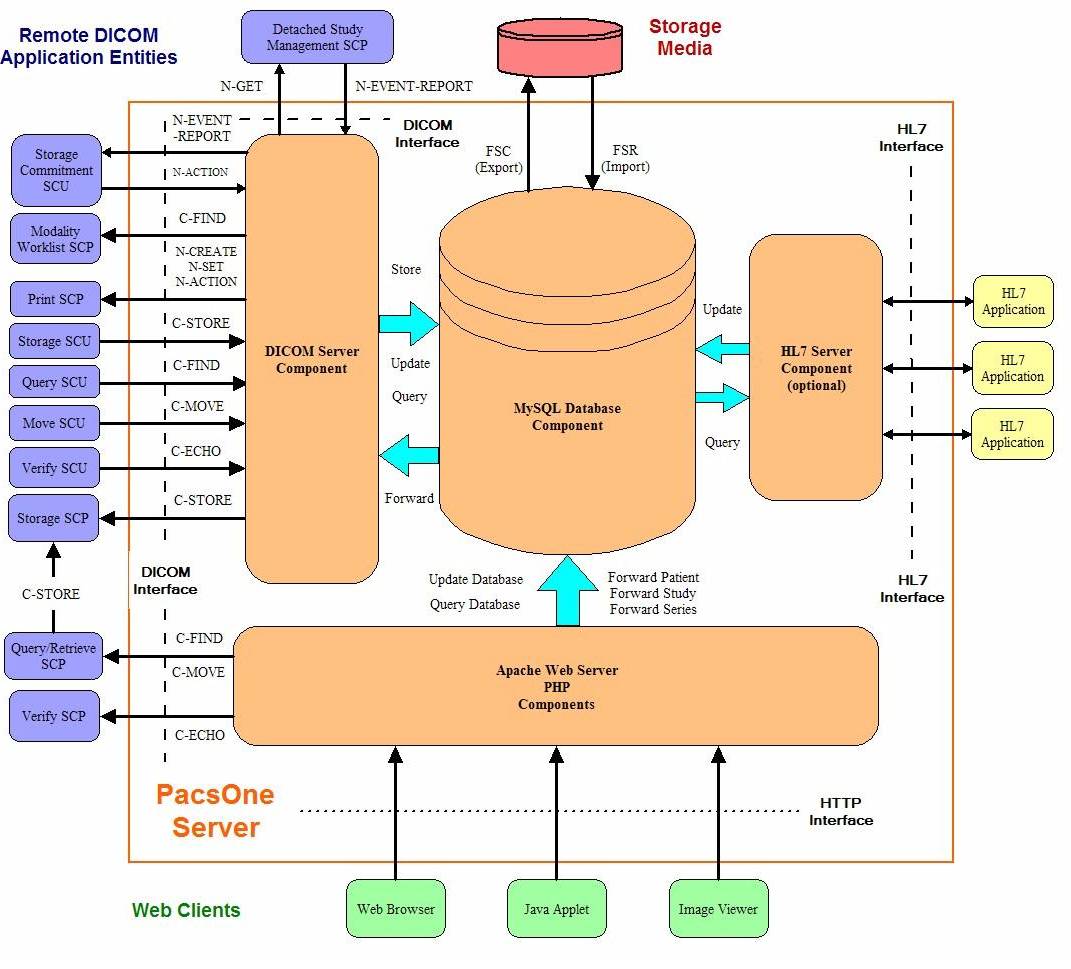
Figure 1 shows the relationship of PacsOne server to external applications. As noted above, PacsOne server does not initiate any action except in response to requests which are received either via DICOM associations or from the web user interface.
FIGURE 1. PacsOne Server Implementation Model
PacsOne server waits for another application to connect to the TCP/IP port number specified when the application is initiated. When a DICOM association request is received, PacsOne server uses a MySQL database table and the following logic to verify the incoming request:
See the Association Initiation and Acceptance Policy sections below on real-world activities for all SOP classes supported by PacsOne Server.
PacsOne server is started automatically when Windows starts up, or user can manually stop and re-start PacsOne server from the 'Services' tablet of the Windows Control Panel. PacsOne server uses a configurable thread pool to service all DICOM 3.0 protocol I/O processing. The number of threads in the thread pool has a default value of 2, and can be configured by modifying the following Registry value for Windows platforms:
HKEY_LOCAL_MACHINE\\SOFTWARE\\RainbowFish Software\\PacsOne\\${AeTitle}\\ThreadPoolSize
Or by modifying the following variable in the "${AeTitle}.ini" configuration file under the directory where PacsOne Server is installed for Linux/MacOS platforms:ThreadPoolSize = 2
NOTE: Setting a large value for the number of threads in the thread pool does not necessarily increase the overall performance of PacsOne server. It is recommended to set the size of thread pool to be twice the number of available processors or CPU's in the system. PacsOne server needs to be re-started if the size of thread pool is modified.
PacsOne server provides Standard Conformance to the following DICOM 3.0 SOP Classes as a SCU:
| SOP Class Name | SOP Class UID |
| Verification SOP Class | 1.2.840.10008.1.1 |
| Computed Radiography Image Storage | 1.2.840.10008.5.1.4.1.1.1 |
| Digital X-ray Image Storage - For Presentation | 1.2.840.10008.5.1.4.1.1.1.1 |
| Digital X-ray Image Storage - For Processing | 1.2.840.10008.5.1.4.1.1.1.1.1 |
| Digital Mammography X-ray Image Storage - For Presentation | 1.2.840.10008.5.1.4.1.1.1.2 |
| Digital Mammography X-ray Image Storage - For Processing | 1.2.840.10008.5.1.4.1.1.1.2.1 |
| CT Image Storage | 1.2.840.10008.5.1.4.1.1.2 |
| Ultrasound Multi-frame Image Storage (retired) | 1.2.840.10008.5.1.4.1.1.3 |
| Ultrasound Multi-frame Image Storage | 1.2.840.10008.5.1.4.1.1.3.1 |
| MR Image Storage | 1.2.840.10008.5.1.4.1.1.4 |
| Nuclear Medicine Image Storage (retired) | 1.2.840.10008.5.1.4.1.1.5 |
| Ultrasound Image Storage (retired) | 1.2.840.10008.5.1.4.1.1.6 |
| Ultrasound Image Storage | 1.2.840.10008.5.1.4.1.1.6.1 |
| Secondary Capture Image Storage | 1.2.840.10008.5.1.4.1.1.7 |
| Standalone Overlay Image Storage | 1.2.840.10008.5.1.4.1.1.8 |
| Standalone Curve Storage | 1.2.840.10008.5.1.4.1.1.9 |
| Standalone Modality LUT Storage | 1.2.840.10008.5.1.4.1.1.10 |
| Standalone VOI LUT Storage | 1.2.840.10008.5.1.4.1.1.11 |
| X-Ray Angiographic Image Storage | 1.2.840.10008.5.1.4.1.1.12.1 |
| X-Ray Radiofluoroscopic Image Storage | 1.2.840.10008.5.1.4.1.1.12.2 |
| X-Ray Angiographic Bi-plane Image Storage (retired) | 1.2.840.10008.5.1.4.1.1.12.3 |
| X-Ray 3D Angiographic Image Storage | 1.2.840.10008.5.1.4.1.1.13.1.1 |
| X-Ray 3D Craniofacial Image Storage | 1.2.840.10008.5.1.4.1.1.13.1.2 |
| Breast Tomosynthesis Image Storage | 1.2.840.10008.5.1.4.1.1.13.1.3 |
| Nuclear Medicine Image Storage | 1.2.840.10008.5.1.4.1.1.20 |
| Positron Emission Tomography (PET) Image Storage | 1.2.840.10008.5.1.4.1.1.128 |
| RT Image Storage | 1.2.840.10008.5.1.4.1.1.481.1 |
| RT Dose Storage | 1.2.840.10008.5.1.4.1.1.481.2 |
| RT Structure Set Storage | 1.2.840.10008.5.1.4.1.1.481.3 |
| RT Plan Storage | 1.2.840.10008.5.1.4.1.1.481.5 |
| VL Endoscopic Image Storage | 1.2.840.10008.5.1.4.1.1.77.1.1 |
| VL Microscopic Image Storage | 1.2.840.10008.5.1.4.1.1.77.1.2 |
| VL Slide-Coordinates Microscopic Image Storage | 1.2.840.10008.5.1.4.1.1.77.1.3 |
| VL Photographic Image Storage | 1.2.840.10008.5.1.4.1.1.77.1.4 |
| Video Photographic Image Storage | 1.2.840.10008.5.1.4.1.1.77.1.4.1 |
| Ophthalmic Photography 8 Bit Image Storage | 1.2.840.10008.5.1.4.1.1.77.1.5.1 |
| Ophthalmic Photography 16 Bit Image Storage | 1.2.840.10008.5.1.4.1.1.77.1.5.2 |
| Ophthalmic Tomography Image Storage | 1.2.840.10008.5.1.4.1.1.77.1.5.4 |
| Enhanced CT Image Storage | 1.2.840.10008.5.1.4.1.1.2.1 |
| Enhanced MR Image Storage | 1.2.840.10008.5.1.4.1.1.4.1 |
| MR Spectroscopy Storage | 1.2.840.10008.5.1.4.1.1.4.2 |
| Enhanced MR Color Image Storage | 1.2.840.10008.5.1.4.1.1.4.3 |
| Raw Data Storage | 1.2.840.10008.5.1.4.1.1.66 |
| Segmentation Storage | 1.2.840.10008.5.1.4.1.1.66.4 |
| Surface Segmentation Storage | 1.2.840.10008.5.1.4.1.1.66.5 |
| Real World Value Mapping Storage | 1.2.840.10008.5.1.4.1.1.67 |
| Grayscale Softcopy Presentation State Storage | 1.2.840.10008.5.1.4.1.1.11.1 |
| Color Softcopy Presentation State Storage | 1.2.840.10008.5.1.4.1.1.11.2 |
| Pseudo-Color Softcopy Presentation State Storage | 1.2.840.10008.5.1.4.1.1.11.3 |
| Blending Softcopy Presentation State Storage | 1.2.840.10008.5.1.4.1.1.11.4 |
| XA/XRF Grayscale Softcopy Presentation State Storage | 1.2.840.10008.5.1.4.1.1.11.5 |
| Video Endoscopic Image Storage | 1.2.840.10008.5.1.4.1.1.77.1.1.1 |
| Encapsulated PDF Storage | 1.2.840.10008.5.1.4.1.1.104.1 |
| Basic Text Structured Report Storage | 1.2.840.10008.5.1.4.1.1.88.11 |
| Enhanced Structured Report Storage | 1.2.840.10008.5.1.4.1.1.88.22 |
| Comprehensive Structured Report Storage | 1.2.840.10008.5.1.4.1.1.88.33 |
| Comprehensive 3D Structured Report Storage | 1.2.840.10008.5.1.4.1.1.88.34 |
| Extensible Structured Report Storage | 1.2.840.10008.5.1.4.1.1.88.35 |
| Chest Computer-Aided Detection (CAD) Structured Report Storage | 1.2.840.10008.5.1.4.1.1.88.65 |
| X-Ray Radiation Dose Structured Report Storage | 1.2.840.10008.5.1.4.1.1.88.67 |
| VL Whole Slide Microscopy Image Storage | 1.2.840.10008.5.1.4.1.1.77.1.6 |
| Breast Tomosynthesis Image Storage | 1.2.840.10008.5.1.4.1.1.13.1.3 |
| Patient Root Query/Retrieve Info Model - FIND | 1.2.840.10008.5.1.4.1.2.1.1 |
| Patient Root Query/Retrieve Info Model - MOVE | 1.2.840.10008.5.1.4.1.2.1.2 |
| Study Root Query/Retrieve Info Model - FIND | 1.2.840.10008.5.1.4.1.2.2.1 |
| Study Root Query/Retrieve Info Model - MOVE | 1.2.840.10008.5.1.4.1.2.2.2 |
| Modality Worklist Info Model - FIND | 1.2.840.10008.5.1.4.31 |
| Detached Study Management | 1.2.840.10008.3.1.2.3.1 |
| Basic Grayscale Print Management Meta | 1.2.840.10008.5.1.1.9 |
| Basic Color Print Management Meta | 1.2.840.10008.5.1.1.18 |
| Key Object Selection Document | 1.2.840.10008.5.1.4.1.1.88.59 |
| Instance Availablity Notification | 1.2.840.10008.5.1.4.33 |
PacsOne server provides Standard Conformance to the following DICOM 3.0 SOP Classes as a SCP:
| SOP Class Name | SOP Class UID |
| Verification SOP Class | 1.2.840.10008.1.1 |
| Computed Radiography Image Storage | 1.2.840.10008.5.1.4.1.1.1 |
| Digital X-ray Image Storage - For Presentation | 1.2.840.10008.5.1.4.1.1.1.1 |
| Digital X-ray Image Storage - For Processing | 1.2.840.10008.5.1.4.1.1.1.1.1 |
| Digital Mammography X-ray Image Storage - For Presentation | 1.2.840.10008.5.1.4.1.1.1.2 |
| Digital Mammography X-ray Image Storage - For Processing | 1.2.840.10008.5.1.4.1.1.1.2.1 |
| CT Image Storage | 1.2.840.10008.5.1.4.1.1.2 |
| Ultrasound Multi-frame Image Storage (retired) | 1.2.840.10008.5.1.4.1.1.3 |
| Ultrasound Multi-frame Image Storage | 1.2.840.10008.5.1.4.1.1.3.1 |
| MR Image Storage | 1.2.840.10008.5.1.4.1.1.4 |
| Nuclear Medicine Image Storage (retired) | 1.2.840.10008.5.1.4.1.1.5 |
| Ultrasound Image Storage (retired) | 1.2.840.10008.5.1.4.1.1.6 |
| Ultrasound Image Storage | 1.2.840.10008.5.1.4.1.1.6.1 |
| Secondary Capture Image Storage | 1.2.840.10008.5.1.4.1.1.7 |
| Standalone Overlay Image Storage | 1.2.840.10008.5.1.4.1.1.8 |
| Standalone Curve Storage | 1.2.840.10008.5.1.4.1.1.9 |
| Standalone Modality LUT Storage | 1.2.840.10008.5.1.4.1.1.10 |
| Standalone VOI LUT Storage | 1.2.840.10008.5.1.4.1.1.11 |
| X-Ray Angiographic Image Storage | 1.2.840.10008.5.1.4.1.1.12.1 |
| X-Ray Radiofluoroscopic Image Storage | 1.2.840.10008.5.1.4.1.1.12.2 |
| X-Ray Angiographic Bi-plane Image Storage (retired) | 1.2.840.10008.5.1.4.1.1.12.3 |
| X-Ray 3D Angiographic Image Storage | 1.2.840.10008.5.1.4.1.1.13.1.1 |
| X-Ray 3D Craniofacial Image Storage | 1.2.840.10008.5.1.4.1.1.13.1.2 |
| Breast Tomosynthesis Image Storage | 1.2.840.10008.5.1.4.1.1.13.1.3 |
| Nuclear Medicine Image Storage | 1.2.840.10008.5.1.4.1.1.20 |
| Positron Emission Tomography (PET) Image Storage | 1.2.840.10008.5.1.4.1.1.128 |
| RT Image Storage | 1.2.840.10008.5.1.4.1.1.481.1 |
| RT Dose Storage | 1.2.840.10008.5.1.4.1.1.481.2 |
| RT Structure Set Storage | 1.2.840.10008.5.1.4.1.1.481.3 |
| RT Plan Storage | 1.2.840.10008.5.1.4.1.1.481.5 |
| VL Endoscopic Image Storage | 1.2.840.10008.5.1.4.1.1.77.1.1 |
| VL Microscopic Image Storage | 1.2.840.10008.5.1.4.1.1.77.1.2 |
| VL Slide-Coordinates Microscopic Image Storage | 1.2.840.10008.5.1.4.1.1.77.1.3 |
| VL Photographic Image Storage | 1.2.840.10008.5.1.4.1.1.77.1.4 |
| Video Photographic Image Storage | 1.2.840.10008.5.1.4.1.1.77.1.4.1 |
| Ophthalmic Photography 8 Bit Image Storage | 1.2.840.10008.5.1.4.1.1.77.1.5.1 |
| Ophthalmic Photography 16 Bit Image Storage | 1.2.840.10008.5.1.4.1.1.77.1.5.2 |
| Ophthalmic Tomography Image Storage | 1.2.840.10008.5.1.4.1.1.77.1.5.4 |
| Enhanced CT Image Storage | 1.2.840.10008.5.1.4.1.1.2.1 |
| Enhanced MR Image Storage | 1.2.840.10008.5.1.4.1.1.4.1 |
| MR Spectroscopy Storage | 1.2.840.10008.5.1.4.1.1.4.2 |
| Enhanced MR Color Image Storage | 1.2.840.10008.5.1.4.1.1.4.3 |
| Raw Data Storage | 1.2.840.10008.5.1.4.1.1.66 |
| Segmentation Storage | 1.2.840.10008.5.1.4.1.1.66.4 |
| Surface Segmentation Storage | 1.2.840.10008.5.1.4.1.1.66.5 |
| Real World Value Mapping Storage | 1.2.840.10008.5.1.4.1.1.67 |
| Grayscale Softcopy Presentation State Storage | 1.2.840.10008.5.1.4.1.1.11.1 |
| Color Softcopy Presentation State Storage | 1.2.840.10008.5.1.4.1.1.11.2 |
| Pseudo-Color Softcopy Presentation State Storage | 1.2.840.10008.5.1.4.1.1.11.3 |
| Blending Softcopy Presentation State Storage | 1.2.840.10008.5.1.4.1.1.11.4 |
| XA/XRF Grayscale Softcopy Presentation State Storage | 1.2.840.10008.5.1.4.1.1.11.5 |
| Video Endoscopic Image Storage | 1.2.840.10008.5.1.4.1.1.77.1.1.1 |
| Encapsulated PDF Storage | 1.2.840.10008.5.1.4.1.1.104.1 |
| Basic Text Structured Report Storage | 1.2.840.10008.5.1.4.1.1.88.11 |
| Enhanced Structured Report Storage | 1.2.840.10008.5.1.4.1.1.88.22 |
| Comprehensive Structured Report Storage | 1.2.840.10008.5.1.4.1.1.88.33 |
| Comprehensive 3D Structured Report Storage | 1.2.840.10008.5.1.4.1.1.88.34 |
| Extensible Structured Report Storage | 1.2.840.10008.5.1.4.1.1.88.35 |
| Chest Computer-Aided Detection (CAD) Structured Report Storage | 1.2.840.10008.5.1.4.1.1.88.65 |
| X-Ray Radiation Dose Structured Report Storage | 1.2.840.10008.5.1.4.1.1.88.67 |
| VL Whole Slide Microscopy Image Storage | 1.2.840.10008.5.1.4.1.1.77.1.6 |
| Breast Tomosynthesis Image Storage | 1.2.840.10008.5.1.4.1.1.13.1.3 |
| Patient Root Query/Retrieve Info Model - FIND | 1.2.840.10008.5.1.4.1.2.1.1 |
| Patient Root Query/Retrieve Info Model - MOVE | 1.2.840.10008.5.1.4.1.2.1.2 |
| Patient Root Query/Retrieve Info Model - GET | 1.2.840.10008.5.1.4.1.2.1.3 |
| Study Root Query/Retrieve Info Model - FIND | 1.2.840.10008.5.1.4.1.2.2.1 |
| Study Root Query/Retrieve Info Model - MOVE | 1.2.840.10008.5.1.4.1.2.2.2 |
| Study Root Query/Retrieve Info Model - GET | 1.2.840.10008.5.1.4.1.2.2.3 |
| Patient/Study Only Query/Retrieve Info Model - FIND | 1.2.840.10008.5.1.4.1.2.3.1 |
| Patient/Study Only Query/Retrieve Info Model - MOVE | 1.2.840.10008.5.1.4.1.2.3.2 |
| Patient/Study Only Query/Retrieve Info Model - GET | 1.2.840.10008.5.1.4.1.2.3.3 |
| Modality Worklist Info Model - FIND | 1.2.840.10008.5.1.4.31 |
| Storage Commitment Push Model | 1.2.840.10008.1.20.1 |
| Modality Performed Procedure Step | 1.2.840.10008.3.1.2.3.3 |
| Modality Performed Procedure Step Retrieve | 1.2.840.10008.3.1.2.3.4 |
| Modality Performed Procedure Step Notification | 1.2.840.10008.3.1.2.3.5 |
| Key Object Selection Document | 1.2.840.10008.5.1.4.1.1.88.59 |
The DICOM Application Context Name (ACN) proposed by PacsOne Server is fixed: "1.2.840.10008.3.1.1". The maximum PDU size which can be transmitted by PacsOne server is fixed at 32 Kbytes. The maximum PDU size which can be received by PacsOne server is up to 32 Kbytes.
The number of simultaneous associations which can be accepted by PacsOne server are limited only by the kernel parameters of underlying TCP/IP implementation and resource utilization of the computer where PacsOne server is installed. PacsOne server utilizes a thread pool to service each association request that it receives. Therefore, PacsOne server can have multiple simultaneous connections, and there is no inherent limitation on the total number of simultaneous associations which a PacsOne server can maintain.
PacsOne server does not support asynchronous operations and will not perform asynchronous window negotiation.
PacsOne server provides the following implementation class UID:
1.2.826.0.1.3680043.2.737
PacsOne server provides the following implementation version name:
PACSONE01AUG03
PacsOne server will attempt to initiate associations in response to user requests from the web user interface to verify DICOM connection status (C-ECHO) to remote Application Entity (AE).
PacsOne server will attempt to initiate associations in response to user requests from the web user interface to query and retrieve (C-FIND) remote Query/Retrieve SCP applications.
PacsOne server will attempt to initiate associations in response to C-MOVE requests from other Application Entities. PacsOne server will only initiate associations in response to valid C-MOVE requests for images that are stored in the MySQL database.
PacsOne server will attempt to initiate associations in response to user selected forwarding requests from the web user interface, where users can select one or more patient(s), study(s) or series to forward (C-STORE) to a remote destination application entity (AE).
The Premium Edition of PacsOne server can also initiate associations to remote destination AE(s) automatically based on the automatic routing table. Users can define entries in the automatic routing table which consist of a source AE title, destination AE title and a schedule, so that the images received from the specified source AE will be automatically forwarded (C-STORE) to one of more destination AE(s) based on the specified schedule, either as soon as received (Immediately) or on a particular 24-hour clock interval., e.g., 7:00 p.m.
PacsOne Server Premium Edition can initiate Modality Worklist - FIND requests to remote Modality Worklist SCP applications, either in response to unsolicited Study Scheduled N-EVENT-REPORT notifications, or by querying the Worklist SCP regularly based on a configurable polling interval. Users can also initiate Modality Worklist - FIND request by clicking on the Get Worklist link from the web user interface.
From the PacsOne Server web user interface, users can select the 'Application Entity' Page to display a list of defined application entities (AE). If the TCP port number for an AE is defined, a Ping link will be displayed in the 'Verify Connection' column. Clicking on the Ping link will initiate a C-ECHO request to the TCP port number of the corresponding AE. A confirmation message will be displayed if the C-ECHO request is successfully acknowledged by the remote AE, otherwise a timeout error or any error response from the remote AE will be displayed.
Table 4 below shows the presentation contexts that are proposed by PacsOne server for verification operations..
| Presentation Context Table | |||||
| Abstract Syntax | Transfer Syntax | Role | Extended Negotiation | ||
| Name | UID | Name List | UID List | ||
| Verification | 1.2.840.10008.1.1 | DICOM Implicit VR Little Endian | 1.2.840.10008.1.2 | SCU | None |
From the PacsOne Server web user interface, users can select the 'Application Entity' Page to display a list of defined application entities (AE). If the TCP port number for an AE is defined, a Query/Retrieve link will be displayed in the 'Remote Exams' column. Clicking on the Query/Retrieve link will initiate a C-FIND request to the TCP port number of the corresponding AE. Any matching patients and/or studies returned by the remote AE will be displayed, otherwise a timeout error or any error response from the remote AE will be displayed.
Table 5 shows the presentation contexts used by PacsOne server when initiating C-FIND requests to remote Query/Retrieve SCP applications.
| Presentation Context Table | |||||
| Abstract Syntax | Transfer Syntax | Role | Extended Negotiation | ||
| Name | UID | Name List | UID List | ||
| Patient Root Query/Retrieve Information Model - FIND | 1.2.840.10008.5.1.4.1.2.1.1 | DICOM Implicit VR Little Endian | 1.2.840.10008.1.2 | SCU | None |
| Patient Root Query/Retrieve Information Model - MOVE | 1.2.840.10008.5.1.4.1.2.1.2 | DICOM Implicit VR Little Endian | 1.2.840.10008.1.2 | SCU | None |
| Study Root Query/Retrieve Information Model - FIND | 1.2.840.10008.5.1.4.1.2.2.1 | DICOM Implicit VR Little Endian | 1.2.840.10008.1.2 | SCU | None |
| Study Root Query/Retrieve Information Model - MOVE | 1.2.840.10008.5.1.4.1.2.2.2 | DICOM Implicit VR Little Endian | 1.2.840.10008.1.2 | SCU | None |
Table 6 below contains the key matching methods supported by PacsOne Server when initiating C-FIND requests to remote Query/Retrieve SCP applications:
| Key Matching Methods | Description | Supported By PacsOne |
| SV | Single Value Matching | Yes |
| UM | Universal Matching | Yes |
| WC | Wild-Card Matching | Premium Edition only |
| DR | Date Range Matching | Premium Edition only |
Table 7 below indicates which keys are used by the PacsOne server for the Patient Root information model when initiating C-FIND requests to remote Query/Retrieve SCP applications.
| Level | Description | Tag | Matching Method | Type |
| Patient | Patient Name | 0010 0010 | SV,UM,WC | R |
| Patient ID | 0010 0020 | SV,UM,WC | U | |
| Patient´s Birth Date | 0010 0030 | SV,UM,DR | O | |
| Patient´s Birth Time | 0010 0032 | O | ||
| Patient´s Sex | 0010 0040 | O | ||
| Patient´s Age | 0010 1010 | O | ||
| Patient´s Size | 0010 1020 | O | ||
| Patient´s Weight | 0010 1030 | O | ||
| Number of Patient Related Studies | 0020 1200 | O | ||
| Number of Patient Related Series | 0020 1202 | O | ||
| Number of Patient Related Instances | 0020 1204 | O | ||
| Study | Study Date | 0008 0020 | SV,UM,DR | R |
| Study Time | 0008 0030 | SV,UM | R | |
| Accession Number | 0008 0050 | SV,UM,WC | R | |
| Referring Physician Name | 0008 0090 | O | ||
| Study Description | 0008 1030 | O | ||
| Study Instance UID | 0020 000D | SV,UM | U | |
| Study ID | 0020 0010 | SV,UM,WC | R | |
| Number of Study Related Series | 0020 1206 | O | ||
| Number of Study Related Instances | 0020 1208 | O | ||
| Series | Series Date | 0008 0021 | SV,UM,DR | O |
| Series Time | 0008 0031 | SV,UM | O | |
| Modality | 0008 0060 | SV,UM,WC | R | |
| Body Part Examined | 0018 0015 | O | ||
| Series Instance UID | 0020 000E | SV,UM | U | |
| Series Number | 0020 0011 | SV,UM | R | |
| Number of Series Related Instances | 0020 1209 | O | ||
| Image | SOP Class UID | 0008 0016 | SV,UM | O |
| SOP Instance UID | 0008 0018 | SV,UM | U | |
| Instance Number | 0020 0013 | SV,UM | R | |
| Overlay Number | 0020 0022 | O | ||
| Curve Number | 0020 0024 | O | ||
| LUT Number | 0020 0026 | O | ||
| Samples Per Pixel | 0028 0002 | O | ||
| Rows | 0028 0010 | O | ||
| Columns | 0028 0011 | O | ||
| Bits Allocated | 0028 0100 | O | ||
| Bits Stored | 0028 0101 | O | ||
| Pixel Representation | 0028 0103 | O |
The associated Real-World activity is a C-MOVE request received from an external application. If an application successfully establishes an association with the PacsOne server and makes a valid C-MOVE request that identifies one or more images known by the PacsOne server, the PacsOne server will query the 'applentity' MySQL database table to see if a matching entry can be found for the specified destination application entity title. If a match is found, the PacsOne server will initiate an association with the destination application entity specified in the incoming C-MOVE request.
In response to a C-MOVE request, PacsOne server builds a complete list of images to be moved. The list includes the SOP class of each image to be moved. PacsOne server extracts the unique SOP classes from the image lists and proposes a set of presentation contexts that includes one presentation context for each unique SOP class identified in the image list. Thus, the association request may have a single presentation context or multiple presentation contexts. Each presentation context contains the abstract syntax that identifies one image class as found in the image list.
| Presentation Context Table | |||||
| Abstract Syntax | Transfer Syntax | Role | Extended Negotiation | ||
| Name | UID | Name List | UID List | ||
| Computed Radiography Image Storage | 1.2.840.10008.5.1.4.1.1.1 | See Proposed Transfer Syntaxes below | See Proposed Transfer Syntaxes below | SCU | None |
| CT Image Storage | 1.2.840.10008.5.1.4.1.1.2 | See Proposed Transfer Syntaxes below | See Proposed Transfer Syntaxes below | SCU | None |
| Ultrasound Multi-frame Image Storage (retired) | 1.2.840.10008.5.1.4.1.1.3 | See Proposed Transfer Syntaxes below | See Proposed Transfer Syntaxes below | SCU | None |
| Ultrasound Multi-frame Image Storage | 1.2.840.10008.5.1.4.1.1.3.1 | See Proposed Transfer Syntaxes below | See Proposed Transfer Syntaxes below | SCU | None |
| MR Image Storage | 1.2.840.10008.5.1.4.1.1.4 | See Proposed Transfer Syntaxes below | See Proposed Transfer Syntaxes below | SCU | None |
| Nuclear Medicine Image Storage (retired) | 1.2.840.10008.5.1.4.1.1.5 | See Proposed Transfer Syntaxes below | See Proposed Transfer Syntaxes below | SCU | None |
| Ultrasound Image Storage (retired) | 1.2.840.10008.5.1.4.1.1.6 | See Proposed Transfer Syntaxes below | See Proposed Transfer Syntaxes below | SCU | None |
| Ultrasound Image Storage | 1.2.840.10008.5.1.4.1.1.6.1 | See Proposed Transfer Syntaxes below | See Proposed Transfer Syntaxes below | SCU | None |
| Secondary Capture Image Storage | 1.2.840.10008.5.1.4.1.1.7 | See Proposed Transfer Syntaxes below | See Proposed Transfer Syntaxes below | SCU | None |
| X-Ray Angiographic Image Storage | 1.2.840.10008.5.1.4.1.1.12.1 | See Proposed Transfer Syntaxes below | See Proposed Transfer Syntaxes below | SCU | None |
| X-Ray Radiofluoroscopic Image Storage | 1.2.840.10008.5.1.4.1.1.12.2 | See Proposed Transfer Syntaxes below | See Proposed Transfer Syntaxes below | SCU | None |
| X-Ray Angiographic Bi-plane Image Storage (retired) | 1.2.840.10008.5.1.4.1.1.12.3 | See Proposed Transfer Syntaxes below | See Proposed Transfer Syntaxes below | SCU | None |
| X-Ray 3D Angiographic Image Storage | 1.2.840.10008.5.1.4.1.1.13.1.1 | See Proposed Transfer Syntaxes below | See Proposed Transfer Syntaxes below | SCU | None |
| X-Ray 3D Craniofacial Image Storage | 1.2.840.10008.5.1.4.1.1.13.1.2 | See Proposed Transfer Syntaxes below | See Proposed Transfer Syntaxes below | SCU | None |
| Breast Tomosynthesis Image Storage | 1.2.840.10008.5.1.4.1.1.13.1.3 | See Proposed Transfer Syntaxes below | See Proposed Transfer Syntaxes below | SCU | None |
| Digital X-ray Image Storage - For Presentation | 1.2.840.10008.5.1.4.1.1.1.1 | See Proposed Transfer Syntaxes below | See Proposed Transfer Syntaxes below | SCU | None |
| Digital X-ray Image Storage - For Processing | 1.2.840.10008.5.1.4.1.1.1.1.1 | See Proposed Transfer Syntaxes below | See Proposed Transfer Syntaxes below | SCU | None |
| Digital Mammography X-ray Image Storage - For Presentation | 1.2.840.10008.5.1.4.1.1.1.2 | See Proposed Transfer Syntaxes below | See Proposed Transfer Syntaxes below | SCU | None |
| Digital Mammography X-ray Image Storage - For Processing | 1.2.840.10008.5.1.4.1.1.1.2.1 | See Proposed Transfer Syntaxes below | See Proposed Transfer Syntaxes below | SCU | None |
| Nuclear Medicine Image Storage | 1.2.840.10008.5.1.4.1.1.20 | See Proposed Transfer Syntaxes below | See Proposed Transfer Syntaxes below | SCU | None |
| Positron Emission Tomography (PET) Image Storage | 1.2.840.10008.5.1.4.1.1.128 | See Proposed Transfer Syntaxes below | See Proposed Transfer Syntaxes below | SCU | None |
| RT Image Storage | 1.2.840.10008.5.1.4.1.1.481.1 | See Proposed Transfer Syntaxes below | See Proposed Transfer Syntaxes below | SCU | None |
| RT Dose Storage | 1.2.840.10008.5.1.4.1.1.481.2 | See Proposed Transfer Syntaxes below | See Proposed Transfer Syntaxes below | SCU | None |
| RT Structure Set Storage | 1.2.840.10008.5.1.4.1.1.481.3 | See Proposed Transfer Syntaxes below | See Proposed Transfer Syntaxes below | SCU | None |
| RT Plan Storage | 1.2.840.10008.5.1.4.1.1.481.5 | See Proposed Transfer Syntaxes below | See Proposed Transfer Syntaxes below | SCU | None |
| VL Endoscopic Image Storage | 1.2.840.10008.5.1.4.1.1.77.1.1 | See Proposed Transfer Syntaxes below | See Proposed Transfer Syntaxes below | SCU | None |
| VL Microscopic Image Storage | 1.2.840.10008.5.1.4.1.1.77.1.2 | See Proposed Transfer Syntaxes below | See Proposed Transfer Syntaxes below | SCU | None |
| VL Slide-Coordinates Microscopic Image Storage | 1.2.840.10008.5.1.4.1.1.77.1.3 | See Proposed Transfer Syntaxes below | See Proposed Transfer Syntaxes below | SCU | None |
| VL Photographic Image Storage | 1.2.840.10008.5.1.4.1.1.77.1.4 | See Proposed Transfer Syntaxes below | See Proposed Transfer Syntaxes below | SCU | None |
| Video Photographic Image Storage | 1.2.840.10008.5.1.4.1.1.77.1.4.1 | See Proposed Transfer Syntaxes below | See Proposed Transfer Syntaxes below | SCU | None |
| Ophthalmic Photography 8 Bit Image Storage | 1.2.840.10008.5.1.4.1.1.77.1.5.1 | See Proposed Transfer Syntaxes below | See Proposed Transfer Syntaxes below | SCU | None |
| Ophthalmic Photography 16 Bit Image Storage | 1.2.840.10008.5.1.4.1.1.77.1.5.2 | See Proposed Transfer Syntaxes below | See Proposed Transfer Syntaxes below | SCU | None |
| Ophthalmic Tomography Image Storage | 1.2.840.10008.5.1.4.1.1.77.1.5.4 | See Proposed Transfer Syntaxes below | See Proposed Transfer Syntaxes below | SCU | None |
| Enhanced CT Image Storage | 1.2.840.10008.5.1.4.1.1.2.1 | See Proposed Transfer Syntaxes below | See Proposed Transfer Syntaxes below | SCU | None |
| Enhanced MR Image Storage | 1.2.840.10008.5.1.4.1.1.4.1 | See Proposed Transfer Syntaxes below | See Proposed Transfer Syntaxes below | SCU | None |
| MR Spectroscopy Storage | 1.2.840.10008.5.1.4.1.1.4.2 | See Proposed Transfer Syntaxes below | See Proposed Transfer Syntaxes below | SCU | None |
| Enhanced MR Color Image Storage | 1.2.840.10008.5.1.4.1.1.4.3 | See Proposed Transfer Syntaxes below | See Proposed Transfer Syntaxes below | SCU | None |
| Raw Data Storage | 1.2.840.10008.5.1.4.1.1.66 | See Proposed Transfer Syntaxes below | See Proposed Transfer Syntaxes below | SCU | None |
| Segmentation Storage | 1.2.840.10008.5.1.4.1.1.66.4 | See Proposed Transfer Syntaxes below | See Proposed Transfer Syntaxes below | SCU | None |
| Surface Segmentation Storage | 1.2.840.10008.5.1.4.1.1.66.5 | See Proposed Transfer Syntaxes below | See Proposed Transfer Syntaxes below | SCU | None |
| Real World Value Mapping Storage | 1.2.840.10008.5.1.4.1.1.67 | See Proposed Transfer Syntaxes below | See Proposed Transfer Syntaxes below | SCU | None |
| Grayscale Softcopy Presentation State Storage | 1.2.840.10008.5.1.4.1.1.11.1 | See Proposed Transfer Syntaxes below | See Proposed Transfer Syntaxes below | SCU | None |
| Color Softcopy Presentation State Storage | 1.2.840.10008.5.1.4.1.1.11.2 | See Proposed Transfer Syntaxes below | See Proposed Transfer Syntaxes below | SCU | None |
| Pseudo-Color Softcopy Presentation State Storage | 1.2.840.10008.5.1.4.1.1.11.3 | See Proposed Transfer Syntaxes below | See Proposed Transfer Syntaxes below | SCU | None |
| Blending Softcopy Presentation State Storage | 1.2.840.10008.5.1.4.1.1.11.4 | See Proposed Transfer Syntaxes below | See Proposed Transfer Syntaxes below | SCU | None |
| XA/XRF Grayscale Softcopy Presentation State Storage | 1.2.840.10008.5.1.4.1.1.11.5 | See Proposed Transfer Syntaxes below | See Proposed Transfer Syntaxes below | SCU | None |
| Video Endoscopic Image Storage | 1.2.840.10008.5.1.4.1.1.77.1.1.1 | See Proposed Transfer Syntaxes below | See Proposed Transfer Syntaxes below | SCU | None |
| Encapsulated PDF Storage | 1.2.840.10008.5.1.4.1.1.104.1 | See Proposed Transfer Syntaxes below | See Proposed Transfer Syntaxes below | SCU | None |
| Basic Text Structured Report Storage | 1.2.840.10008.5.1.4.1.1.88.11 | See Proposed Transfer Syntaxes below | See Proposed Transfer Syntaxes below | SCU | None |
| Enhanced Structured Report Storage | 1.2.840.10008.5.1.4.1.1.88.22 | See Proposed Transfer Syntaxes below | See Proposed Transfer Syntaxes below | SCU | None |
| Comprehensive Structured Report Storage | 1.2.840.10008.5.1.4.1.1.88.33 | See Proposed Transfer Syntaxes below | See Proposed Transfer Syntaxes below | SCU | None |
| Comprehensive 3D Structured Report Storage | 1.2.840.10008.5.1.4.1.1.88.34 | See Proposed Transfer Syntaxes below | See Proposed Transfer Syntaxes below | SCU | None |
| Extensible Structured Report Storage | 1.2.840.10008.5.1.4.1.1.88.35 | See Proposed Transfer Syntaxes below | See Proposed Transfer Syntaxes below | SCU | None |
| Chest Computer-Aided Detection (CAD) Structured Report Storage | 1.2.840.10008.5.1.4.1.1.88.65 | See Proposed Transfer Syntaxes below | See Proposed Transfer Syntaxes below | SCU | None |
| X-Ray Radiation Dose Structured Report Storage | 1.2.840.10008.5.1.4.1.1.88.67 | See Proposed Transfer Syntaxes below | See Proposed Transfer Syntaxes below | SCU | None |
| VL Whole Slide Microscopy Image Storage | 1.2.840.10008.5.1.4.1.1.77.1.6 | See Proposed Transfer Syntaxes below | See Proposed Transfer Syntaxes below | SCU | None |
| Breast Tomosynthesis Image Storage | 1.2.840.10008.5.1.4.1.1.13.1.3 | See Proposed Transfer Syntaxes below | See Proposed Transfer Syntaxes below | SCU | None |
| Key Object Selection Document | 1.2.840.10008.5.1.4.1.1.88.59 | See Proposed Transfer Syntaxes below | See Proposed Transfer Syntaxes below | SCU | None |
PacsOne Server Basic Edition only supports Implicit VR Little Endian Transfer Syntax. Some images may have been stored by the PacsOne server with private elements whose encoding scheme is unknown by the PacsOne server. These elements will be transmitted by PacsOne server exactly as they were received (in Implicit VR Little Endian Transfer Syntax), so they should be unaltered upon transmission.
PacsOne Server Premium Edition supports the following additional transfer syntaxes:
| Transfer Syntax Name | Transfer Syntax UID |
| Implicit VR, Little Endian (DICOM Default) | 1.2.840.10008.1.2 |
| Explicit VR, Little Endian | 1.2.840.10008.1.2.1 |
| Explicit VR, Big Endian | 1.2.840.10008.1.2.2 |
| Explicit VR, JPEG Lossless, Non-hierarchical, First-order prediction (Process 14) | 1.2.840.10008.1.2.4.70 |
| Explicit VR, JPEG Lossless (Process 14) | 1.2.840.10008.1.2.4.57 |
| Explicit VR, JPEG Baseline (Process 1) | 1.2.840.10008.1.2.4.50 |
| Explicit VR, JPEG Extended (Process 2 & 4) | 1.2.840.10008.1.2.4.51 |
| RLE Lossless | 1.2.840.10008.1.2.5 |
| MPEG2 Image Compression | 1.2.840.10008.1.2.4.100 |
| MPEG4 AVC/H.264 Image Compression | 1.2.840.10008.1.2.4.102 |
| MPEG4 Image Compression | 1.2.840.10008.1.2.4.103 |
| JPEG 2000 Part-1 Lossless Only Compression | 1.2.840.10008.1.2.4.90 |
| JPEG 2000 Part-1 Lossless Or Lossy Compression | 1.2.840.10008.1.2.4.91 |
| JPEG-LS Lossless Compression | 1.2.840.10008.1.2.4.80 |
| JPEG-LS Near-Lossless Compression | 1.2.840.10008.1.2.4.81 |
When sending images to a remote AE, PacsOne Server will propose the same transfer syntax in which the stored SOP instance is encoded. For example, the encoding transfer syntax is Explicit VR Little-Endian transfer syntax (UID 1.2.840.10008.1.2.1), PacsOne Server will also propose the default Implicit VR Little-Endian transfer syntax (UID 1.2.840.10008.1.2), so that when sending images to applications that do not support the Explicit VR Little-Endian transfer syntax (for example, eFilm), PacsOne Server Premium Edition will translate from the encoding Explicit VR Little-Endian to the Implicit VR Little-Endian transfer syntax.
All C-STORE operations are in the context of a C-MOVE request from an external application. PacsOne server sends one C-MOVE response message for each attempted C-STORE operation. PacsOne server does not attempt any extended negotiation. PacsOne server does not delete any elements from the files it transfers. Therefore the set of optional elements depends entirely on the contents of the files which were originally stored on the PacsOne server.
In the event that PacsOne server receives an unsuccessful C-STORE response, PacsOne server will continue sending the remaining images in the requested set.
From the PacsOne web user interface, users can select one or more patient(s), study(s) or series while browsing through the list, if the current user has 'Forward' privilege (Premium Edition) or 'Modify' privilege (Basic Edition) enabled, there will be a Forward button displayed below the listed patient, study or series list. Users can click on the Forward button and then select a destination AE title from a drop-down list of application entities currently defined in the 'applentity' table.
Same as Section 3.3.3.2.
Same as Section 3.3.3.3.
Same as Section 3.3.3.4.
PacsOne Server Premium Edition supports automatic image routing based on entries defined in the Automatic Routing table. When an image is received by PacsOne Server, it will query the Automatic Routing table to see if there is an entry matches with the source application entity (AE) title. If a match is found, then the received image will be forwarded to the destination AE title specified for the matching source AE title, based on the schedule specified for the matching entry. If there are multiple matches (multiple destination AEs defined for the same source AE), then the received image will be forwarded to multiple destination AEs based on the corresponding schedule.
Users can add, delete and modify entries in the Automatic Routing table from the PacsOne Server web user interface, given that the logged-in user has the required 'Modify' privilege enabled.
Same as Section 3.3.3.2.
Same as Section 3.3.3.3.
Same as Section 3.3.3.4.
From the PacsOne Server web user interface, users can select the 'Application Entity' Page to display a list of defined application entities (AE). If the TCP port number for an AE is defined and the remote AE has been defined as Modality Worklist SCP ('worklistScp' column set to 'True' in the 'applentity' table), a Get Worklist link will be displayed in the 'Modality Worklist' column. Clicking on the Get Worklist link will initiate a Modality Worklist - FIND request to the TCP port number of the corresponding AE. Any matching result returned by the remote Modality Worklist SCP will be displayed, otherwise a timeout error or any error response from the remote AE will be displayed.
PacsOne Server Premium Edition can also receive unsolicited Study-Scheduled N-EVENT-REPORT notifications. PacsOne Server will then send Modality Worklist - FIND commands to query all configured Modality Worklist SCP application entities for the corresponding study.
PacsOne Server Premium Edition also polls any configured Modality Worklist SCP application entities to update the Worklist table on a regular basis. The default polling interval is 10 minutes, which can be changed by modifying the following Registry value for Windows platforms:
HKEY_LOCAL_MACHINE\\SOFTWARE\\RainbowFish Software\\PacsOne\\${AeTitle}\\WorklistPollInterval\\
Or by modifying the following variable in the "${AeTitle}.ini" configuration file under the directory where PacsOne Server is installed for Linux/MacOS platforms:WorklistPollInterval = 10
where ${AeTitle} is the AE title assigned for PacsOne Server.NOTE: Change the polling interval value to zero(0) will disable automatic polling of Modality Worklist SCP applications.
Table 10 below shows the presentation contexts that are proposed by PacsOne server for Modality Worklist - FIND operations..
| Presentation Context Table | |||||
| Abstract Syntax | Transfer Syntax | Role | Extended Negotiation | ||
| Name | UID | Name List | UID List | ||
| Modality Worklist Info Model - FIND | 1.2.840.10008.5.1.4.31 | DICOM Implicit VR Little Endian | 1.2.840.10008.1.2 | SCU | None |
Table 11 below contains the key matching methods supported by PacsOne Server when initiating Modality Worklist-FIND requests to remote Worklist SCP applications:
| Key Matching Methods | Description | Supported By PacsOne |
| SV | Single Value Matching | Premium Edition only |
| UM | Universal Matching | Premium Edition only |
| WC | Wild-Card Matching | Premium Edition only |
| DR | Date Range Matching | Premium Edition only |
Table 12 below indicates which keys are used by the PacsOne Server for the Modality Worklist - FIND requests to remote Modality Worklist SCP applications.
| Module | Description | Tag | Matching Method | Return Type |
| Scheduled Procedure Step | Scheduled Procedure Step Sequence | 0040 0100 | 1 | |
| >Modality | 0008,0060 | UM,WC | 1 | |
| >Scheduled Station AE Title | 0040 0001 | UM,WC | 1 | |
| >Scheduled Procedure Step Start Date | 0040 0002 | SV,UM,DR | 1 | |
| >Scheduled Procedure Step Start Time | 0040 0003 | UM | 1 | |
| Requested Procedure | Requested Procedure ID | 0040 1001 | UM,WC | 1 |
| Requested Procedure Description | 0032 1060 | 1C | ||
| Study Instance UID | 0020 000D | 1 | ||
| Referenced Study Sequence | 0008 1110 | 2 | ||
| >Referenced SOP Class UID | 0008 1150 | 1C | ||
| >Referenced SOP Instance UID | 0008 1155 | 1C | ||
| Imaging Service Request | Accession Number | 0008 0050 | SV,UM,WC | 2 |
| Referring Physician´s Name | 0008 0090 | UM | 2 | |
| Requesting Physician´s Name | 0032 1032 | 2 | ||
| Patient Identification | Patient´s Name | 0010 0010 | SV,UM,WC | 1 |
| Patient ID | 0010 1020 | SV,UM,WC | 1 | |
| Patient Demographic | Patient´s Birth Date | 0010 1030 | SV,UM,DR | 2 |
| Patient´s Sex | 0010 1040 | SV,UM | 2 |
After logging into the PacsOne Server web user interface, if the 'Print' privilege has been enabled, the current user can select a list of patients, studies, series or images, and click on the Print button.
The user can then select the destination remote printer, make any appropriate changes to the print parameters, then click on the Print button to send the selected patients, studies, series or images to the printer.
| Presentation Context Table | |||||
| Abstract Syntax | Transfer Syntax | Role | Extended Negotiation | ||
| Name | UID | Name List | UID List | ||
| Basic Grayscale Print Management Meta | 1.2.840.1000.8.5.1.1.9 | DICOM Implicit VR Little Endian | 1.2.840.10008.1.2 | SCU | None |
| Basic Color Print Management Meta | 1.2.840.1000.8.5.1.1.18 | DICOM Implicit VR Little Endian | 1.2.840.10008.1.2 | SCU | None |
See Table 13 above.
PacsOne Server supports the following required print SOP classes for the Basic Grayscale/Color Management Meta classes:
| SOP Class Name | SOP Class UID |
| Basic Film Session | 1.2.840.10008.5.1.1.1 |
| Basic Film Box | 1.2.840.10008.5.1.1.2 |
| Basic Grayscale Image Box | 1.2.840.10008.5.1.1.4 |
| Basic Color Image Box | 1.2.840.10008.5.1.1.4.1 |
| Printer | 1.2.840.10008.5.1.1.16 |
PacsOne Server supports the following optional print SOP classes for the Basic Grayscale/Color Management Meta classes:
| SOP Class Name | SOP Class UID |
| Basic Annotation Box | 1.2.840.10008.5.1.1.15 |
PacsOne Server supports the following attributes for N-CREATE command of the Basic Film Session SOP class:
| N-CREATE Attributes of the Basic Film Session SOP class | ||
| Tag | Description | Possible Values |
| (2000,0010) | Number of Copies | 1 - 99 |
| (2000,0020) | Print Priority | LOW, MED, HIGH |
| (2000,0030) | Medium Type | BLUE FILM, CLEAR FILM, PAPER |
| (2000,0040) | Film Destination | MAGAZINE, PROCESSOR, BIN_i |
| (2000,0050) | Film Session Label | PacsOne-YYYY.MM.DD.MM.HH.SS |
PacsOne Server also uses N-DELETE to delete the created Basic Film Sessio SOP instance returned by the remote Print SCP.
PacsOne Server supports the following attributes for N-CREATE command of the Basic Film Box SOP class:
| N-CREATE Attributes of the Basic Film Box SOP class | ||
| Tag | Description | Possible Values |
| (2010,0010) | Image Display Format | STANDARD\C,R; R1,R2,R3; C1,C2,C3; SLIDE; SUPERSLIDE |
| (2010,0030) | Annotation Display Format ID | Printer secific annotation display format string |
| (2010,0040) | Film Orientation | LANDSCAPE, PORTRAIT |
| (2010,0500) | Referenced Film Session Sequence | |
| (0008,1150) | > Referenced SOP Class UID | |
| (0008,1155) | > Referenced SOP Instance UID | |
PacsOne Server also uses N-ACTION to print a complete Basic Film Box SOP instance and N-DELETE to delete the SOP instance after printing is complete.
PacsOne Server supports the following attributes for N-SET command of the Basic Grayscale Image Box SOP class:
| N-SET Attributes of the Basic Grayscale Image Box SOP class | ||
| Tag | Description | Possible Values |
| (2020,0010) | Image Position | 1,2,... |
| (2020,0110) | Preformatted Grayscale Image Sequence | |
| (0028,0002) | >Samples Per Pixel | |
| (0028,0004) | >Photometric Interpretation | MONOCHROME1, MONOCHROME2 |
| (0028,0010) | >Rows | >0 |
| (0028,0011) | >Columns | >0 |
| (0028,0034) | >Pixel Aspect Ratio | 1 |
| (0028,0100) | >Bits Allocated | 8,16 |
| (0028,0101) | >Bits Stored | 8,12 |
| (0028,0102) | >High Bit | 7,11 |
| (0028,0103) | >Pixel Representation | 0 |
| (7FE0,0010) | >Pixel Data | |
PacsOne Server supports the following attributes for N-GET command of the Printer Box SOP class:
| N-GET Attributes of the Printer SOP class | ||
| Tag | Description | |
| (0008,0070) | Manufacturer | |
| (0008,1090) | Manufacturer Model Name | |
| (0018,1000) | Device Serial Number | |
| (0018,1020) | Software Versions | |
| (0018,1200) | Date Last Calibration | |
| (0018,1201) | Last Calibration | |
| (2110,0010) | Printer Status | |
| (2110,0020) | Printer Status Info | |
| (2110,0030) | Printer Name | |
PacsOne Server supports the following attributes for N-GET command of the Basic Annotation Box SOP Class:
| N-GET Attributes of the Printer SOP class | ||
| Tag | Description | |
| (2030,0010) | Annotation Position | |
| (2030,0020) | Text String | |
PacsOne Server Premium Edition supports synchronizing its local database with remote studies stored on external application entities, based on user-specified synchronization schedules for the remote AE.
When adding or modifying an application entity, if the remote AE supports Dicom Query/Retrieve functions as a SCP, i.e., the 'Query/Retrieve SCP' checkbox is selected, users can select whether to enable or disable remote-synchronization for this remote AE, and whether to synchronize with all remote studies or only those recent studies received within the last N days on the remote AE.
Users can add, delete and modify synchronization schedules (up to 24 per remote AE) from the PacsOne Server web user interface, provided that the logged-in user has the required 'Modify' privilege enabled.
Same as Section 3.3.2.2.
Same as Section 3.3.2.2.
Same as Section 3.3.2.3.
PacsOne server accepts unsolicited N-EVENT-REPORT notifications sent from Detached Study Management SCP application entities. PacsOne Server will then issue N-GET request back to the remote SCP to get more information for the corresponding study.
Additionally, upon receipt of the Study Scheduled event notification sent from the Detached Study Management SCP, PacsOne Server will initiate a Modality Worklist - FIND request to configured Modality Worklist SCP application entity(s) to query about the corresponding study information contained in the event report.
When PacsOne Server receives any Detached Study Management N-EVENT-REPORT notifications sent from a Detached Study Management SCP AE, it will first validate the association request by checking the remote AE title against the internal 'applentity' table. If access is Enabled in the 'applentity' table, the association request will be accepted and the event notification will be processed. Otherwise, the association request will be rejected by PacsOne Server and this event notification will not be processed.
Table 21 shows the presentation contexts that may be accepted by PacsOne server for Detached Study Management N-EVENT-REPORT notifications.
| Presentation Context Table | |||||
| Abstract Syntax | Transfer Syntax | Role | Extended Negotiation | ||
| Name | UID | Name List | UID List | ||
| Detached Study Management | 1.2.840.10008.3.1.2.3.1 | DICOM Implicit VR Little Endian | 1.2.840.10008.1.2 | SCU | None |
PacsOne Server supports the following attributes in the N-EVENT-REPORT-RQ notification sent from a Detached Study Management SCP application entity:
| Event Type Name | Attribute Name | Tag |
| Study Created | Instance Creation Date | 0008 0012 |
| Referenced Patient Sequence | 0008 1120 | |
| >Referenced SOP Class UID | 0008 1150 | |
| >Referenced SOP Instance UID | 0008 1155 | |
| Referenced Visit Sequence | 0008 1125 | |
| >Referenced SOP Class UID | 0008 1150 | |
| >Referenced SOP Instance UID | 0008 1155 | |
| Instance Creation Time | 0008 0013 | |
| Instance Creator UID | 0008 0014 | |
| Study Status ID | 0032 000A | |
| Study Scheduled | Specific Character Set | 0008 0005 |
| Referenced Patient Sequence | 0008 1120 | |
| >Referenced SOP Class UID | 0008 1150 | |
| >Referenced SOP Instance UID | 0008 1155 | |
| Referenced Visit Sequence | 0008 1125 | |
| >Referenced SOP Class UID | 0008 1150 | |
| >Referenced SOP Instance UID | 0008 1155 | |
| Scheduled Study Start Date | 0032 1000 | |
| Scheduled Study Start Time | 0032 1001 | |
| Scheduled Study Location | 0032 1020 | |
| Scheduled Study Location Application Entity Title | 0032 1021 | |
| Requested Procedure Description | 0032 1060 | |
| Requested Procedure Code Sequence | 0032 1064 | |
| >Code Value | 0008 0100 | |
| >Coding Scheme Designator | 0008 0102 | |
| >Code Meaning | 0008 0104 | |
| Patient Arrived | Study Arrival Date | 0032 1040 |
| Study Arrival Time | 0032 1041 | |
| Study Started | Study Date | 0008 0020 |
| Study Time | 0008 0030 | |
| Study Completed | Referenced Performed Procedure Step Sequence | 0008 1111 |
| >Referenced SOP Class UID | 0008 1150 | |
| >Referenced SOP Instance UID | 0008 1155 | |
| Study Completed Date | 0032 1050 | |
| Study Completed Time | 0032 1051 | |
| Study Verified | Referenced Performed Procedure Step Sequence | 0008 1111 |
| >Referenced SOP Class UID | 0008 1150 | |
| >Referenced SOP Instance UID | 0008 1155 | |
| Study Verified Date | 0032 0032 | |
| Study Verified Time | 0032 0033 | |
| Study Read | Study Read Date | 0032 0034 |
| Study Read Time | 0032 0035 | |
| Study Deleted |
PacsOne Server returns one of the following status codes in the N-EVENT-REPORT-RSP sent back to the Detached Study Management SCP:
| Service Status | Further Meaning | Status Codes | Description |
| Sucess | Sucess | 0x0000 | Operation performed properly |
PacsOne server will accept any number of Detached Study Management SOP classes that are listed in Table 21 above, provided that the requesting application is allowed access to the PacsOne server (via the 'applentity' MySQL database table). The PacsOne server defines no limit on the number of presentation contexts accepted. In the event that the PacsOne server runs out of resources when trying to accept multiple presentation contexts, PacsOne server will reject the association request.
PacsOne server does not check for duplicate presentation contexts and will accept duplicate presentation contexts.
PacsOne Server only supports the Implicit VR Little Endian transfer syntax when accepting Detached Study Management N-EVENT-REPORT requests. Any proposed presentation context which includes the Implicit VR Little Endian transfer syntax will be accepted with the Implicit VR Little Endian transfer syntax. Any proposed presentation context that does not include the Implicit VR Little Endian transfer syntax will be rejected.
From the Application Entity page of PacsOne Server, if a remote AE is configured as a Storage Commitment Report SCP and the "Request Storage Commitment Report for Dicom images sent to this SCP" option is enabled for this remote AE, then PacsOne Server will request Dicom Storage Commitment Report(via the N-ACTION-RQ command) for any Dicom SOP instance sent to this remote AE.
Table 24 below shows the presentation contexts that are proposed by PacsOne server for Storage Commitment Push Model requests.
| Presentation Context Table | |||||
| Abstract Syntax | Transfer Syntax | Role | Extended Negotiation | ||
| Name | UID | Name List | UID List | ||
| Storage Commitment Push Model | 1.2.840.10008.1.20.1 | DICOM Implicit VR Little Endian | 1.2.840.10008.1.2 | SCU | None |
PacsOne Server supports the following elements for this SOP class as an SCU:
| Action Type Name | Action Type ID | Attribute Name | Tag |
| Request Storage Commitment | 1 | Transaction UID | (0008,1195) |
| Referenced SOP Sequence | (0008,1199) | ||
| >Referenced SOP Class UID | (0008,1150) | ||
| >Referenced SOP Instance UID | (0008,1155) |
After receiving the Dicom Storage Commitment Report request sent from PacsOne Server, the remote AE will respond by sending the Storage Commitment Report for the requested SOP instances in the form of Dicom N-EVENT-REPORT messages back to PacsOne Server. The N-EVENT-REPORT contains the Transaction UID value contained in the initiating N-ACTION-RQ request sent from PacsOne Server. The N-EVENT-REPORT is sent on a separate association from the initiating N-ACTION-RQ request.
PacsOne Server supports the Event Report Information as specified in Table 26 below:
| Action Type Name | Event Type ID | Attribute Name | Tag |
| Storage Commitment Request Successful | 1 | Transaction UID | (0008,1195) |
| Referenced SOP Sequence | (0008,1199) | ||
| >Referenced SOP Class UID | (0008,1150) | ||
| >Referenced SOP Instance UID | (0008,1155) | ||
| Storage Commitment Request Complete - Failure Exist | 2 | Transaction UID | (0008,1195) |
| Referenced SOP Sequence | (0008,1199) | ||
| >Referenced SOP Class UID | (0008,1150) | ||
| >Referenced SOP Instance UID | (0008,1155) | ||
| Failed SOP Sequence | (0008,1198) | ||
| >Referenced SOP Class UID | (0008,1150) | ||
| >Referenced SOP Instance UID | (0008,1155) | ||
| >Failure Reason | (0008,1197) |
After receiving the Storage Commitment Report (N-EVENT-REPORT) from the remote AE, PacsOne Server will display one of the following status indications for the containing Dicom study of the referenced SOP instances for which the reports have been received:
PacsOne server accepts associations for the purpose of storing images in its MySQL database or for the purpose of performing query/retrieve operations on the images that have been previously stored.
PacsOne server will only accept association requests from applications that have been defined during configuration. In addition, the PacsOne server will only store images sent by application entities that have been enabled in the 'applentity' MySQL database table.
PacsOne server accepts associations from applications that wish to perform a verification (C-ECHO) operation on the PacsOne server.
The real-world activity associated with the C-ECHO request is that an external application wishes to verify network or server operation without initiating any actual work.
Table 27 shows the presentation contexts that may be accepted by PacsOne server for verification operations..
| Presentation Context Table | |||||
| Abstract Syntax | Transfer Syntax | Role | Extended Negotiation | ||
| Name | UID | Name List | UID List | ||
| Verification | 1.2.840.10008.1.1 | DICOM Implicit VR Little Endian | 1.2.840.10008.1.2 | SCP | None |
PacsOne server will accept any number of verification SOP classes that are listed in Table 3 above, provided that the requesting application is allowed access to the PacsOne server (via the 'applentity' MySQL database table). The PacsOne server defines no limit on the number of presentation contexts accepted. In the event that the PacsOne server runs out of resources when trying to accept multiple presentation contexts, PacsOne server will reject the association request.
PacsOne server does not check for duplicate presentation contexts and will accept duplicate presentation contexts.
PacsOne Server only supports the Implicit VR Little Endian transfer syntax when accepting verification requests. Any proposed presentation context which includes the Implicit VR Little Endian transfer syntax will be accepted with the Implicit VR Little Endian transfer syntax. Any proposed presentation context that does not include the Implicit VR Little Endian transfer syntax will be rejected.
PacsOne server accepts associations from applications that wish to store images using the C-STORE command.
The associated Real-World activity associated with the C-STORE operation is the storage of the images on the disk of the system upon which the PacsOne server is running. Images are stored by writing the data set of the C-STORE command directly to disk, either with no further header or interpretation ("Native" format), or with the standard file header described in the DICOM 3.0 Part 10 document (DICOM Part 10 format). The above storage formats are configurable when PacsOne server is installed by running the 'SETUP.EXE' program, they can also be modified later by changing the following Registry value for Windows platforms:
HKEY_LOCAL_MACHINE\\SOFTWARE\\RainbowFish Software\\PacsOne\\${AeTitle}\\StorageFormat\\
Or by modifying the following variable in the "${AeTitle}.ini" configuration file under the directory where PacsOne Server is installed for Linux/MacOS platforms:StorageFormat= DicomPart10
to either "DicomPart10" or "Native" string values (case insensitive).
After an image is stored to disk, the PacsOne server updates the MySQL database with patient, study, series and image information; this MySQL database is used by the PacsOne server for query/retrieve operations, it is also used by the Apache web server to display patient, study, series, and image information, display stored images through a web browser, and maintain patient/study/series/ image tables for authorized users.
PacsOne server will issue a failure status if it is unable to store the image on disk, if the image does not conform to the IOD of the SOP class under which it was transmitted, or if the PacsOne server is not able to successfully update its MySQL database.
The following Presentation Contexts shown in Table 28 are acceptable to the PacsOne server when receiving images.
| Presentation Context Table | |||||
| Abstract Syntax | Transfer Syntax | Role | Extended Negotiation | ||
| Name | UID | Name List | UID List | ||
| Computed Radiography Image Storage | 1.2.840.10008.5.1.4.1.1.1 | See Transfer Syntax Selection Policies Below | See Transfer Syntax Selection Policies Below | SCP | None |
| CT Image Storage | 1.2.840.10008.5.1.4.1.1.2 | See Transfer Syntax Selection Policies Below | See Transfer Syntax Selection Policies Below | SCP | None |
| Ultrasound Multi-frame Image Storage (retired) | 1.2.840.10008.5.1.4.1.1.3 | See Transfer Syntax Selection Policies Below | See Transfer Syntax Selection Policies Below | SCP | None |
| Ultrasound Multi-frame Image Storage | 1.2.840.10008.5.1.4.1.1.3.1 | See Transfer Syntax Selection Policies Below | See Transfer Syntax Selection Policies Below | SCP | None |
| MR Image Storage | 1.2.840.10008.5.1.4.1.1.4 | See Transfer Syntax Selection Policies Below | See Transfer Syntax Selection Policies Below | SCP | None |
| Nuclear Medicine Image Storage (retired) | 1.2.840.10008.5.1.4.1.1.5 | See Transfer Syntax Selection Policies Below | See Transfer Syntax Selection Policies Below | SCP | None |
| Ultrasound Image Storage (retired) | 1.2.840.10008.5.1.4.1.1.6 | See Transfer Syntax Selection Policies Below | See Transfer Syntax Selection Policies Below | SCP | None |
| Ultrasound Image Storage | 1.2.840.10008.5.1.4.1.1.6.1 | See Transfer Syntax Selection Policies Below | See Transfer Syntax Selection Policies Below | SCP | None |
| Secondary Capture Image Storage | 1.2.840.10008.5.1.4.1.1.7 | See Transfer Syntax Selection Policies Below | See Transfer Syntax Selection Policies Below | SCP | None |
| X-Ray Angiographic Image Storage | 1.2.840.10008.5.1.4.1.1.12.1 | See Transfer Syntax Selection Policies Below | See Transfer Syntax Selection Policies Below | SCP | None |
| X-Ray Radiofluoroscopic Image Storage | 1.2.840.10008.5.1.4.1.1.12.2 | See Transfer Syntax Selection Policies Below | See Transfer Syntax Selection Policies Below | SCP | None |
| X-Ray Angiographic Bi-plane Image Storage (retired) | 1.2.840.10008.5.1.4.1.1.12.3 | See Transfer Syntax Selection Policies Below | See Transfer Syntax Selection Policies Below | SCP | None |
| X-Ray 3D Angiographic Image Storage | 1.2.840.10008.5.1.4.1.1.13.1.1 | See Transfer Syntax Selection Policies Below | See Transfer Syntax Selection Policies Below | SCP | None |
| X-Ray 3D Craniofacial Image Storage | 1.2.840.10008.5.1.4.1.1.13.1.2 | See Transfer Syntax Selection Policies Below | See Transfer Syntax Selection Policies Below | SCP | None |
| Breast Tomosynthesis Image Storage | 1.2.840.10008.5.1.4.1.1.13.1.3 | See Transfer Syntax Selection Policies Below | See Transfer Syntax Selection Policies Below | SCP | None |
| Digital X-ray Image Storage - For Presentation | 1.2.840.10008.5.1.4.1.1.1.1 | See Transfer Syntax Selection Policies Below | See Transfer Syntax Selection Policies Below | SCP | None |
| Digital X-ray Image Storage - For Processing | 1.2.840.10008.5.1.4.1.1.1.1.1 | See Transfer Syntax Selection Policies Below | See Transfer Syntax Selection Policies Below | SCP | None |
| Digital Mammography X-ray Image Storage - For Presentation | 1.2.840.10008.5.1.4.1.1.1.2 | See Transfer Syntax Selection Policies Below | See Transfer Syntax Selection Policies Below | SCP | None |
| Digital Mammography X-ray Image Storage - For Processing | 1.2.840.10008.5.1.4.1.1.1.2.1 | See Transfer Syntax Selection Policies Below | See Transfer Syntax Selection Policies Below | SCP | None |
| Nuclear Medicine Image Storage | 1.2.840.10008.5.1.4.1.1.20 | See Transfer Syntax Selection Policies Below | See Transfer Syntax Selection Policies Below | SCP | None |
| Positron Emission Tomography (PET) Image Storage | 1.2.840.10008.5.1.4.1.1.128 | See Transfer Syntax Selection Policies Below | See Transfer Syntax Selection Policies Below | SCP | None |
| RT Image Storage | 1.2.840.10008.5.1.4.1.1.481.1 | See Transfer Syntax Selection Policies Below | See Transfer Syntax Selection Policies Below | SCP | None |
| RT Dose Storage | 1.2.840.10008.5.1.4.1.1.481.2 | See Transfer Syntax Selection Policies Below | See Transfer Syntax Selection Policies Below | SCP | None |
| RT Structure Set Storage | 1.2.840.10008.5.1.4.1.1.481.3 | See Transfer Syntax Selection Policies Below | See Transfer Syntax Selection Policies Below | SCP | None |
| RT Plan Storage | 1.2.840.10008.5.1.4.1.1.481.5 | See Transfer Syntax Selection Policies Below | See Transfer Syntax Selection Policies Below | SCP | None |
| VL Endoscopic Image Storage | 1.2.840.10008.5.1.4.1.1.77.1.1 | See Transfer Syntax Selection Policies Below | See Transfer Syntax Selection Policies Below | SCP | None |
| VL Microscopic Image Storage | 1.2.840.10008.5.1.4.1.1.77.1.2 | See Transfer Syntax Selection Policies Below | See Transfer Syntax Selection Policies Below | SCP | None |
| VL Slide-Coordinates Microscopic Image Storage | 1.2.840.10008.5.1.4.1.1.77.1.3 | See Transfer Syntax Selection Policies Below | See Transfer Syntax Selection Policies Below | SCP | None |
| VL Photographic Image Storage | 1.2.840.10008.5.1.4.1.1.77.1.4 | See Transfer Syntax Selection Policies Below | See Transfer Syntax Selection Policies Below | SCP | None |
| Video Photographic Image Storage | 1.2.840.10008.5.1.4.1.1.77.1.4.1 | See Transfer Syntax Selection Policies Below | See Transfer Syntax Selection Policies Below | SCP | None |
| Ophthalmic Photography 8 Bit Image Storage | 1.2.840.10008.5.1.4.1.1.77.1.5.1 | See Transfer Syntax Selection Policies Below | See Transfer Syntax Selection Policies Below | SCP | None |
| Ophthalmic Photography 16 Bit Image Storage | 1.2.840.10008.5.1.4.1.1.77.1.5.2 | See Transfer Syntax Selection Policies Below | See Transfer Syntax Selection Policies Below | SCP | None |
| Ophthalmic Tomography Image Storage | 1.2.840.10008.5.1.4.1.1.77.1.5.4 | See Transfer Syntax Selection Policies Below | See Transfer Syntax Selection Policies Below | SCP | None |
| Enhanced CT Image Storage | 1.2.840.10008.5.1.4.1.1.2.1 | See Transfer Syntax Selection Policies Below | See Transfer Syntax Selection Policies Below | SCP | None |
| Enhanced MR Image Storage | 1.2.840.10008.5.1.4.1.1.4.1 | See Transfer Syntax Selection Policies Below | See Transfer Syntax Selection Policies Below | SCP | None |
| MR Spectroscopy Storage | 1.2.840.10008.5.1.4.1.1.4.2 | See Transfer Syntax Selection Policies Below | See Transfer Syntax Selection Policies Below | SCP | None |
| Enhanced MR Color Image Storage | 1.2.840.10008.5.1.4.1.1.4.3 | See Transfer Syntax Selection Policies Below | See Transfer Syntax Selection Policies Below | SCP | None |
| Raw Data Storage | 1.2.840.10008.5.1.4.1.1.66 | See Transfer Syntax Selection Policies Below | See Transfer Syntax Selection Policies Below | SCP | None |
| Segmentation Storage | 1.2.840.10008.5.1.4.1.1.66.4 | See Transfer Syntax Selection Policies Below | See Transfer Syntax Selection Policies Below | SCP | None |
| Surface Segmentation Storage | 1.2.840.10008.5.1.4.1.1.66.5 | See Transfer Syntax Selection Policies Below | See Transfer Syntax Selection Policies Below | SCP | None |
| Real World Value Mapping Storage | 1.2.840.10008.5.1.4.1.1.67 | See Transfer Syntax Selection Policies Below | See Transfer Syntax Selection Policies Below | SCP | None |
| Grayscale Softcopy Presentation State Storage | 1.2.840.10008.5.1.4.1.1.11.1 | See Transfer Syntax Selection Policies Below | See Transfer Syntax Selection Policies Below | SCP | None |
| Color Softcopy Presentation State Storage | 1.2.840.10008.5.1.4.1.1.11.2 | See Transfer Syntax Selection Policies Below | See Transfer Syntax Selection Policies Below | SCP | None |
| Pseudo-Color Softcopy Presentation State Storage | 1.2.840.10008.5.1.4.1.1.11.3 | See Transfer Syntax Selection Policies Below | See Transfer Syntax Selection Policies Below | SCP | None |
| Blending Softcopy Presentation State Storage | 1.2.840.10008.5.1.4.1.1.11.4 | See Transfer Syntax Selection Policies Below | See Transfer Syntax Selection Policies Below | SCP | None |
| XA/XRF Grayscale Softcopy Presentation State Storage | 1.2.840.10008.5.1.4.1.1.11.5 | See Transfer Syntax Selection Policies Below | See Transfer Syntax Selection Policies Below | SCP | None |
| Video Endoscopic Image Storage | 1.2.840.10008.5.1.4.1.1.77.1.1.1 | See Transfer Syntax Selection Policies Below | See Transfer Syntax Selection Policies Below | SCP | None |
| Encapsulated PDF Storage | 1.2.840.10008.5.1.4.1.1.104.1 | See Transfer Syntax Selection Policies Below | See Transfer Syntax Selection Policies Below | SCP | None |
| Basic Text Structured Report Storage | 1.2.840.10008.5.1.4.1.1.88.11 | See Transfer Syntax Selection Policies Below | See Transfer Syntax Selection Policies Below | SCP | None |
| Enhanced Structured Report Storage | 1.2.840.10008.5.1.4.1.1.88.22 | See Transfer Syntax Selection Policies Below | See Transfer Syntax Selection Policies Below | SCP | None |
| Comprehensive Structured Report Storage | 1.2.840.10008.5.1.4.1.1.88.33 | See Transfer Syntax Selection Policies Below | See Transfer Syntax Selection Policies Below | SCP | None |
| Comprehensive 3D Structured Report Storage | 1.2.840.10008.5.1.4.1.1.88.34 | See Transfer Syntax Selection Policies Below | See Transfer Syntax Selection Policies Below | SCP | None |
| Extensible Structured Report Storage | 1.2.840.10008.5.1.4.1.1.88.35 | See Transfer Syntax Selection Policies Below | See Transfer Syntax Selection Policies Below | SCP | None |
| Chest Computer-Aided Detection (CAD) Structured Report Storage | 1.2.840.10008.5.1.4.1.1.88.65 | See Transfer Syntax Selection Policies Below | See Transfer Syntax Selection Policies Below | SCP | None |
| X-Ray Radiation Dose Structured Report Storage | 1.2.840.10008.5.1.4.1.1.88.67 | See Transfer Syntax Selection Policies Below | See Transfer Syntax Selection Policies Below | SCP | None |
| VL Whole Slide Microscopy Image Storage | 1.2.840.10008.5.1.4.1.1.77.1.6 | See Transfer Syntax Selection Policies Below | See Transfer Syntax Selection Policies Below | SCP | None |
| Breast Tomosynthesis Image Storage | 1.2.840.10008.5.1.4.1.1.13.1.3 | See Transfer Syntax Selection Policies Below | See Transfer Syntax Selection Policies Below | SCP | None |
| Key Object Selection Document | 1.2.840.10008.5.1.4.1.1.88.59 | See Transfer Syntax Selection Policies Below | See Transfer Syntax Selection Policies Below | SCP | None |
The PacsOne server implements Level 2 (Full) conformance for the Storage SOP Class. The raw image files themselves are not modified.
In the event that an image is successfully stored by PacsOne server, it may be accessed by requesting associations with the PacsOne server and performing query/retrieve operations. PacsOne server can also display stored images to web browser clients through the Apache web server interface.
PacsOne server stores images for an indefinite period. The stored images, as well as stored patient, study, series and image database records can be deleted from the Apache web server interface by users authorized with UPDATE privilege to the MySQL database.
PacsOne server returns the following status codes in response to a C-STORE request:
| Status Code | Status | Description |
| 0000H | Success | Image successfully stored |
| A700H | Refused | Out of resources, unable to create local file |
| A701H | Refused | Out of resources, failed to access database |
| A702H | Refused | Out of resources, memory allocation error |
| A703H | Refused | Out of resources, conflict with existing patient ID |
| A900H | Error | Data set does not match SOP Class |
| C000H | Error | Cannot understand |
In the case of an error of an error storing an image, there is no documented method for recovery. Trouble-shooting information can be retrieved from the PacsOne server log file. The directory path for PacsOne server log files is stored in the following Registry value for Windows platforms:
HKEY_LOCAL_MACHINE\\SOFTWARE\\RainbowFish Software\\PacsOne\\${AeTitle}\\LogDirectory
Or by modifying the following variable in the "${AeTitle}.ini" configuration file under the directory where PacsOne Server is installed for Linux/MacOS platforms:LogDirectory = /var/log/pacsone
PacsOne server will accept any number of storage SOP classes that are listed in Table 28 above, provided that the requesting application is known to the PacsOne server and has been enabled to store images on the MySQL database (via the 'applentity' MySQL database table).
PacsOne server defines no limit on the number of presentation contexts accepted. In the event that PacsOne server runs out of resources when trying to accept multiple presentation contexts, the PacsOne server will reject the association request.
PacsOne server does not check for duplicate presentation contexts and will accept duplicate presentation contexts in the association request.
PacsOne Server Basic Edition only supports the Implicit VR Little Endian transfer syntax. Any proposed presentation context which includes the Implicit VR Little Endian transfer syntax will be accepted with the Implicit VR Little Endian transfer syntax. Any proposed presentation context that does not include the Implicit VR Little Endian transfer syntax will be rejected.
PacsOne Server Premium Edition supports the following additional transfer syntaxes:
| Transfer Syntax Name | Transfer Syntax UID |
| Implicit VR, Little Endian (DICOM Default) | 1.2.840.10008.1.2 |
| Explicit VR, Little Endian | 1.2.840.10008.1.2.1 |
| Explicit VR, Big Endian | 1.2.840.10008.1.2.2 |
| Explicit VR, JPEG Lossless, Non-hierarchical, First-order prediction (Process 14) | 1.2.840.10008.1.2.4.70 |
| Explicit VR, JPEG Lossless (Process 14) | 1.2.840.10008.1.2.4.57 |
| Explicit VR, JPEG Baseline (Process 1) | 1.2.840.10008.1.2.4.50 |
| Explicit VR, JPEG Extended (Process 2 & 4) | 1.2.840.10008.1.2.4.51 |
| RLE Lossless | 1.2.840.10008.1.2.5 |
| MPEG2 Image Compression | 1.2.840.10008.1.2.4.100 |
| MPEG4 AVC/H.264 Image Compression | 1.2.840.10008.1.2.4.102 |
| MPEG4 Image Compression | 1.2.840.10008.1.2.4.103 |
| JPEG 2000 Part-1 Lossless Only Compression | 1.2.840.10008.1.2.4.90 |
| JPEG 2000 Part-1 Lossless Or Lossy Compression | 1.2.840.10008.1.2.4.91 |
| JPEG-LS Lossless Compression | 1.2.840.10008.1.2.4.80 |
| JPEG-LS Near-Lossless Compression | 1.2.840.10008.1.2.4.81 |
When PacsOne Server Premium Edition receives association requests which contain multiple presentation contexts with different transfer syntaxes, PacsOne Server Premium Edition will accept those presentation contexts with supported transfer syntaxes listed above, and reject any presentation context with un-supported transfer syntax. If multiple transfer syntaxes are proposed in a presentation context by the remote C-STORE SCU, and PacsOne Server Premium Edition supports one of more of them, then the first transfer syntax on the list presented will be selected. Users can also define a preferred transfer syntax by defining a named Registry value below:
HKEY_LOCAL_MACHINE\\SOFTWARE\\RainbowFish Software\\PacsOne\\${AeTitle}\\PreferredXferSyntaxRx\\
Or by modifying the following variable in the "${AeTitle}.ini" configuration file under the directory where PacsOne Server is installed for Linux/MacOS platforms:PreferredXferSyntaxRx = 1.2.840.10008.1.2
If the above named Registry value is defined and it's on the list of transfer syntaxes presented by the remote C-STORE SCU, PacsOne Server Premium Edition will use the specified transfer syntax instead of selecting the first supported transfer syntax from the list presented by the remote AE.
PacsOne Server Premium Edition provides Standard Conformance to the following DICOM V3.0 Structured Reporting SOP Class as an SCU and SCP.
The following Image Storage SOP Classes may be referenced by instances of Structured Reporting SOP Class.
| SOP Class | SOP Class UID |
| Computed Radiography Image Storage | 1.2.840.10008.5.1.4.1.1.1 |
| CT Image Storage | 1.2.840.10008.5.1.4.1.1.2 |
| Ultrasound Multi-frame Image Storage (retired) | 1.2.840.10008.5.1.4.1.1.3 |
| Ultrasound Multi-frame Image Storage | 1.2.840.10008.5.1.4.1.1.3.1 |
| MR Image Storage | 1.2.840.10008.5.1.4.1.1.4 |
| Nuclear Medicine Image Storage (retired) | 1.2.840.10008.5.1.4.1.1.5 |
| Ultrasound Image Storage (retired) | 1.2.840.10008.5.1.4.1.1.6 |
| Ultrasound Image Storage | 1.2.840.10008.5.1.4.1.1.6.1 |
| Secondary Capture Image Storage | 1.2.840.10008.5.1.4.1.1.7 |
| X-Ray Angiographic Image Storage | 1.2.840.10008.5.1.4.1.1.12.1 |
| X-Ray Radiofluoroscopic Image Storage | 1.2.840.10008.5.1.4.1.1.12.2 |
| X-Ray Angiographic Bi-plane Image Storage (retired) | 1.2.840.10008.5.1.4.1.1.12.3 |
| X-Ray 3D Angiographic Image Storage | 1.2.840.10008.5.1.4.1.1.13.1.1 |
| X-Ray 3D Craniofacial Image Storage | 1.2.840.10008.5.1.4.1.1.13.1.2 |
| Breast Tomosynthesis Image Storage | 1.2.840.10008.5.1.4.1.1.13.1.3 |
| Digital X-ray Image Storage - For Presentation | 1.2.840.10008.5.1.4.1.1.1.1 |
| Digital X-ray Image Storage - For Processing | 1.2.840.10008.5.1.4.1.1.1.1.1 |
| Digital Mammography X-ray Image Storage - For Presentation | 1.2.840.10008.5.1.4.1.1.1.2 |
| Digital Mammography X-ray Image Storage - For Processing | 1.2.840.10008.5.1.4.1.1.1.2.1 |
| Nuclear Medicine Image Storage | 1.2.840.10008.5.1.4.1.1.20 |
| Positron Emission Tomography (PET) Image Storage | 1.2.840.10008.5.1.4.1.1.128 |
| RT Image Storage | 1.2.840.10008.5.1.4.1.1.481.1 |
| RT Dose Storage | 1.2.840.10008.5.1.4.1.1.481.2 |
| RT Structure Set Storage | 1.2.840.10008.5.1.4.1.1.481.3 |
| RT Plan Storage | 1.2.840.10008.5.1.4.1.1.481.5 |
| Raw Data Storage | 1.2.840.10008.5.1.4.1.1.66 |
| Segmentation Storage | 1.2.840.10008.5.1.4.1.1.66.4 |
| Surface Segmentation Storage | 1.2.840.10008.5.1.4.1.1.66.5 |
| VL Endoscopic Image Storage | 1.2.840.10008.5.1.4.1.1.77.1.1 |
| VL Microscopic Image Storage | 1.2.840.10008.5.1.4.1.1.77.1.2 |
| VL Slide-Coordinates Microscopic Image Storage | 1.2.840.10008.5.1.4.1.1.77.1.3 |
| VL Photographic Image Storage | 1.2.840.10008.5.1.4.1.1.77.1.4 |
| Video Photographic Image Storage | 1.2.840.10008.5.1.4.1.1.77.1.4.1 |
| Ophthalmic Photography 8 Bit Image Storage | 1.2.840.10008.5.1.4.1.1.77.1.5.1 |
| Ophthalmic Photography 16 Bit Image Storage | 1.2.840.10008.5.1.4.1.1.77.1.5.2 |
| Ophthalmic Tomography Image Storage | 1.2.840.10008.5.1.4.1.1.77.1.5.4 |
| Enhanced CT Image Storage | 1.2.840.10008.5.1.4.1.1.2.1 |
| Enhanced MR Image Storage | 1.2.840.10008.5.1.4.1.1.4.1 |
| MR Spectroscopy Storage | 1.2.840.10008.5.1.4.1.1.4.2 |
| Enhanced MR Color Image Storage | 1.2.840.10008.5.1.4.1.1.4.3 |
PacsOne server accepts associations from applications that wish to perform query (C-FIND) and retrieve (C-MOVE) operations on images that have been previously stored in the MySQL database.
The real-world activity associated with C-FIND and C-MOVE requests are query and retrieval operations initiated by another application. An application other than the PacsOne server queries PacsOne server for patient/study/series/image information that has been previously stored in the MySQL database and can request that the PacsOne server send images to a third application entity.
Table 32 shows the presentation contexts that may be accepted by PacsOne server for query operations.
| Presentation Context Table | |||||
| Abstract Syntax | Transfer Syntax | Role | Extended Negotiation | ||
| Name | UID | Name List | UID List | ||
| Patient Root Query/Retrieve Information Model - FIND | 1.2.840.10008.5.1.4.1.2.1.1 | DICOM Implicit VR Little Endian | 1.2.840.10008.1.2 | SCP | Relational queries |
| Patient Root Query/Retrieve Information Model - MOVE | 1.2.840.10008.5.1.4.1.2.1.2 | DICOM Implicit VR Little Endian | 1.2.840.10008.1.2 | SCP | Relational queries |
| Patient Root Query/Retrieve Information Model - GET | 1.2.840.10008.5.1.4.1.2.1.3 | DICOM Implicit VR Little Endian | 1.2.840.10008.1.2 | SCP | Relational queries |
| Study Root Query/Retrieve Information Model - FIND | 1.2.840.10008.5.1.4.1.2.2.1 | DICOM Implicit VR Little Endian | 1.2.840.10008.1.2 | SCP | Relational queries |
| Study Root Query/Retrieve Information Model - MOVE | 1.2.840.10008.5.1.4.1.2.2.2 | DICOM Implicit VR Little Endian | 1.2.840.10008.1.2 | SCP | Relational queries |
| Study Root Query/Retrieve Information Model - GET | 1.2.840.10008.5.1.4.1.2.2.3 | DICOM Implicit VR Little Endian | 1.2.840.10008.1.2 | SCP | Relational queries |
| Patient/Study Only Information Model - FIND | 1.2.840.10008.5.1.4.1.2.3.1 | DICOM Implicit VR Little Endian | 1.2.840.10008.1.2 | SCP | Relational queries |
| Patient/Study Only Information Model - MOVE | 1.2.840.10008.5.1.4.1.2.3.2 | DICOM Implicit VR Little Endian | 1.2.840.10008.1.2 | SCP | Relational queries |
| Patient/Study Only Information Model - GET | 1.2.840.10008.5.1.4.1.2.3.3 | DICOM Implicit VR Little Endian | 1.2.840.10008.1.2 | SCP | Relational queries |
PacsOne server supports relational queries in addition to hierarchical queries. Table 34 below indicates which keys are supported by the PacsOne server for the Patient Root information model. Table 35 below indicates which keys are supported by the PacsOne server for the Study Root information model.
PacsOne server also supports the Patient/Study Only information model. The keys supported for that model are the same keys found in Table 34 with a level of either "Patient" or "Study".
Table 33 below contains the key matching methods supported by PacsOne Server when processing C-FIND requests from remote Query/Retrieve SCU applications:
| Key Matching Methods | Description | Supported By PacsOne |
| SV | Single Value Matching | Yes |
| UM | Universal Matching | Yes |
| WC | Wild-Card Matching | Yes |
| DR | Date Range Matching | Premium Edition only |
| TR | Time Range Matching | Premium Edition only |
| LU | List Of UID Matching | Premium Edition only |
Table 34 indicates which keys are supported by the PacsOne server for the Patient Root information model. These tables include all optional and required keys that are supported. Optional keys are supported like required keys.
| Level | Description | Tag | Matching Method | Type |
| Patient | Patient Name | 0010 0010 | SV,UM,WC | R |
| Patient ID | 0010 0020 | SV,UM,WC | U | |
| Patient´s Birth Date | 0010 0030 | SV,UM,DR | O | |
| Patient´s Birth Time | 0010 0032 | SV,UM,TR | O | |
| Patient´s Sex | 0010 0040 | SV,UM | O | |
| Patient´s Age | 0010 1010 | O | ||
| Patient´s Size | 0010 1020 | O | ||
| Patient´s Weight | 0010 1030 | O | ||
| Number of Patient Related Studies | 0020 1200 | O | ||
| Number of Patient Related Series | 0020 1202 | O | ||
| Number of Patient Related Instances | 0020 1204 | O | ||
| Study | Study Date | 0008 0020 | SV,UM,DR | R |
| Study Time | 0008 0030 | SV,UM,TR | R | |
| Accession Number | 0008 0050 | SV,UM,WC | R | |
| Modalities In Study | 0008 0061 | SV,UM,WC | O | |
| Referring Physician Name | 0008 0090 | O | ||
| Study Description | 0008 1030 | O | ||
| Study Instance UID | 0020 000D | SV,UM,WC | U | |
| Study ID | 0020 0010 | SV,UM,WC | R | |
| Number of Study Related Series | 0020 1206 | O | ||
| Number of Study Related Instances | 0020 1208 | O | ||
| Series | Series Date | 0008 0021 | SV,UM,DR | O |
| Series Time | 0008 0031 | SV,UM,TR | O | |
| Modality | 0008 0060 | SV,UM,WC | R | |
| Body Part Examined | 0018 0015 | O | ||
| Series Instance UID | 0020 000E | SV,UM,WC | U | |
| Series Number | 0020 0011 | SV,UM | R | |
| Number of Series Related Instances | 0020 1209 | O | ||
| Image | Instance Creation Date | 0008 0012 | O | |
| Instance Creation Time | 0008 0013 | O | ||
| SOP Class UID | 0008 0016 | SV,UM,WC | O | |
| SOP Instance UID | 0008 0018 | SV,UM,WC | U | |
| Instance Number | 0020 0013 | SV,UM | R | |
| Overlay Number | 0020 0022 | O | ||
| Curve Number | 0020 0024 | O | ||
| LUT Number | 0020 0026 | O | ||
| Samples Per Pixel | 0028 0002 | O | ||
| Rows | 0028 0010 | O | ||
| Columns | 0028 0011 | O | ||
| Bits Allocated | 0028 0100 | O | ||
| Bits Stored | 0028 0101 | O | ||
| Pixel Representation | 0028 0103 | O |
Table 35 indicates which keys are supported by the PacsOne server for the Study Root information model. These tables include all optional and required keys that are supported. Optional keys are supported like required keys.
| Level | Description | Tag | Matching Method | Type |
| Study | Study Date | 0008 0020 | SV,UM,DR | R |
| Study Time | 0008 0030 | SV,UM,TR | R | |
| Accession Number | 0008 0050 | SV,UM,WC | R | |
| Modalities In Study | 0008 0061 | SV,UM,WC | O | |
| Patient Name | 0010 0010 | SV,UM,WC | R | |
| Patient ID | 0010 0020 | SV,UM,WC | R | |
| Study ID | 0020 0010 | SV,UM,WC | R | |
| Study Instance UID | 0020 000D | SV,UM,WC | U | |
| Referring Physician Name | 0008 0090 | O | ||
| Study Description | 0008 1030 | O | ||
| Patient´s Birth Date | 0010 0030 | SV,UM,DR | O | |
| Patient´s Birth Time | 0010 0032 | SV,UM,TR | O | |
| Patient´s Sex | 0010 0040 | SV,UM | O | |
| Patient´s Age | 0010 1010 | O | ||
| Patient´s Size | 0010 1020 | O | ||
| Patient´s Weight | 0010 1030 | O | ||
| Series | Series Date | 0008 0021 | SV,UM,DR | O |
| Series Time | 0008 0031 | SV,UM,TR | O | |
| Modality | 0008 0060 | SV,UM,WC | R | |
| Body Part Examined | 0018 0015 | O | ||
| Series Number | 0020 0011 | SV,UM | R | |
| Series Instance UID | 0020 000E | SV,UM,WC | U | |
| Image | Instance Creation Date | 0008 0012 | O | |
| Instance Creation Time | 0008 0013 | O | ||
| SOP Instance UID | 0008 0018 | SV,UM,WC | U | |
| SOP Class UID | 0008 0016 | SV,UM,WC | O | |
| Image Number | 0020 0013 | SV,UM | R | |
| Overlay Number | 0020 0022 | O | ||
| Curve Number | 0020 0024 | O | ||
| LUT Number | 0020 0026 | O | ||
| Samples Per Pixel | 0028 0002 | O | ||
| Rows | 0028 0010 | O | ||
| Columns | 0028 0011 | O | ||
| Bits Allocated | 0028 0100 | O | ||
| Bits Stored | 0028 0101 | O | ||
| Pixel Representation | 0028 0103 | O |
PacsOne server supports the three FIND SOP classes listed in Table 3. In response to a C-FIND request, PacsOne server returns the following C-FIND-RSP status codes:
| Status Code | Status | Description |
| 0000H | Success | Operation performed properly |
| A700H | Refused | Out of Resources |
| A900H | Error | Identifier does not match SOP Class |
| C000H | Error | Unable to Process |
| FE00H | Cancel | Sub-operations terminated due to Cancel Indication |
| FF00H | Pending | Sub-operations are continuing |
PacsOne server supports the three MOVE SOP classes listed in Table 3. In response to a C-MOVE request, PacsOne server supports the Storage SOP classes that are listed in Table 8 when initiating C-STORE sub-operations.
PacsOne server returns the following status codes in response to a C-MOVE request:
| Status Code | Status | Description |
| 0000H | Success | Operation performed properly |
| A701H | Refused | Out of Resources - Unable to calculate number of matches |
| A702H | Refused | Out of Resources - Unable to perform sub-operations |
| A801H | Refused | Move destination unknown |
| A900H | Error | Identifier does not match SOP Class |
| B000H | Warning | Sub-operations Complete - One or more Failures |
| C000H | Error | Unable to Process |
| FE00H | Cancel | Sub-operations terminated due to Cancel Indication |
| FF00H | Pending | Sub-operations are continuing |
PacsOne server will accept any number of query SOP classes that are listed in Table 3 above, provided that the requesting application is known to the PacsOne server and has been allowed access to the MySQL database (via the 'applentity' MySQL database table). PacsOne server defines no limit on the number of presentation contexts accepted. In the event that PacsOne server runs out of resources when trying to accept multiple presentation contexts, PacsOne server will reject the association request.
PacsOne server does not check for duplicate presentation contexts and will accept duplicate presentation contexts.
PacsOne server only supports the Implicit VR Little Endian transfer syntax. Any proposed presentation context which includes the Implicit VR Little Endian transfer syntax will be accepted with the Implicit VR Little Endian transfer syntax. Any proposed presentation context that does not include the Implicit VR Little Endian transfer syntax will be rejected.
PacsOne server accepts associations from applications that wish to perform Worklist Query (Worklist-FIND) operations on worklist items that have been previously received and stored in the MySQL database.
Table 38 below shows the presentation contexts that are accepted by PacsOne server for Modality Worklist - FIND requests.
| Presentation Context Table | |||||
| Abstract Syntax | Transfer Syntax | Role | Extended Negotiation | ||
| Name | UID | Name List | UID List | ||
| Modality Worklist Info Model - FIND | 1.2.840.10008.5.1.4.31 | DICOM Implicit VR Little Endian | 1.2.840.10008.1.2 | SCP | None |
Table 39 below contains the key matching methods supported by PacsOne Server when servicing Modality Worklist-FIND requests from remote Worklist SCU applications:
| Key Matching Methods | Description | Supported By PacsOne |
| SV | Single Value Matching | Premium Edition only |
| UM | Universal Matching | Premium Edition only |
| WC | Wild-Card Matching | Premium Edition only |
| DR | Date Range Matching | Premium Edition only |
| LU | List Of UID Matching | Premium Edition only |
Table 40 below indicates the keys accepted by the PacsOne Server for the Modality Worklist - FIND requests sent from remote Modality Worklist SCU applications.
| Module | Description | Tag | Matching Method | Return Type |
| Scheduled Procedure Step | Scheduled Procedure Step Sequence | 0040 0100 | 1 | |
| >Modality | 0008,0060 | UM,WC | 1 | |
| >Scheduled Station AE Title | 0040 0001 | UM,WC | 1 | |
| >Scheduled Procedure Step Start Date | 0040 0002 | SV,UM,DR | 1 | |
| >Scheduled Procedure Step Start Time | 0040 0003 | UM | 1 | |
| Requested Procedure | Requested Procedure ID | 0040 1001 | UM,WC | 1 |
| Requested Procedure Description | 0032 1060 | 1C | ||
| Study Instance UID | 0020 000D | 1 | ||
| Referenced Study Sequence | 0008 1110 | 2 | ||
| >Referenced SOP Class UID | 0008 1150 | 1C | ||
| >Referenced SOP Instance UID | 0008 1155 | 1C | ||
| Imaging Service Request | Accession Number | 0008 0050 | SV,UM,WC | 2 |
| Referring Physician´s Name | 0008 0090 | UM | 2 | |
| Requesting Physician´s Name | 0032 1032 | 2 | ||
| Patient Identification | Patient´s Name | 0010 0010 | SV,UM,WC | 1 |
| Patient ID | 0010 1020 | SV,UM,WC | 1 | |
| Patient Demographic | Patient´s Birth Date | 0010 1030 | SV,UM,DR | 2 |
| Patient´s Sex | 0010 1040 | SV,UM | 2 |
PacsOne server will accept any number of query SOP classes that are listed in Table 38 above, provided that the requesting application is known to the PacsOne server and has been allowed access to the MySQL database (via the 'applentity' MySQL database table). PacsOne server defines no limit on the number of presentation contexts accepted. In the event that PacsOne server runs out of resources when trying to accept multiple presentation contexts, PacsOne server will reject the association request.
PacsOne server only supports the Implicit VR Little Endian transfer syntax. Any proposed presentation context which includes the Implicit VR Little Endian transfer syntax will be accepted with the Implicit VR Little Endian transfer syntax. Any proposed presentation context that does not include the Implicit VR Little Endian transfer syntax will be rejected.
PacsOne Server stores images that are sent to it from an SCU. The request for storage commitment may then be transmitted to PacsOne Server with a list of references to one or more SOP instances. PacsOne Server will receive and respond to DIMSE N-ACTION of Request Storage Commitment for a set of referenced SOP instances.
Table 41 below shows the presentation contexts that are accepted by PacsOne server for Storage Commitment Push Model requests.
| Presentation Context Table | |||||
| Abstract Syntax | Transfer Syntax | Role | Extended Negotiation | ||
| Name | UID | Name List | UID List | ||
| Storage Commitment Push Model | 1.2.840.10008.1.20.1 | DICOM Implicit VR Little Endian | 1.2.840.10008.1.2 | SCP | None |
PacsOne Server supports the following elements for this SOP class as an SCP:
| Action Type Name | Action Type ID | Attribute Name | Tag |
| Request Storage Commitment | 1 | Transaction UID | (0008,1195) |
| Referenced SOP Sequence | (0008,1199) | ||
| >Referenced SOP Class UID | (0008,1150) | ||
| >Referenced SOP Instance UID | (0008,1155) |
After the Storage Commitment Push Model request is received, PacsOne Server will query its database record to determine if the referenced SOP instances exist in its database tables. If so, PacsOne Server will further check to see if the raw image files that correspond to the referenced SOP instances do exist and are valid in the local storage file system.
If PacsOne Server determines that both the database records and raw image files exist and are valid for the referenced SOP instances, PacsOne Server will issue an N-EVENT-REPORT to the SCU including references to the successfully stored SOP Instances contained in the N-ACTION request. Otherwise, PacsOne Server will issue an N-EVENT-REPORT to the SCU including references to the failed SOP Instances contained in the N-ACTION request.
The N-EVENT-REPORT contains the Transaction UID value contained in the initiating N-ACTION request. The N-EVENT-REPORT is sent on a separate association from the N-ACTION request.
PacsOne Server supports the Event Report Information as specified in Table 43 below:
| Action Type Name | Event Type ID | Attribute Name | Tag |
| Storage Commitment Request Successful | 1 | Transaction UID | (0008,1195) |
| Referenced SOP Sequence | (0008,1199) | ||
| >Referenced SOP Class UID | (0008,1150) | ||
| >Referenced SOP Instance UID | (0008,1155) | ||
| Storage Commitment Request Complete - Failure Exist | 2 | Transaction UID | (0008,1195) |
| Referenced SOP Sequence | (0008,1199) | ||
| >Referenced SOP Class UID | (0008,1150) | ||
| >Referenced SOP Instance UID | (0008,1155) | ||
| Failed SOP Sequence | (0008,1198) | ||
| >Referenced SOP Class UID | (0008,1150) | ||
| >Referenced SOP Instance UID | (0008,1155) | ||
| >Failure Reason | (0008,1197) |
PacsOne server will accept any number of Storage Commitment SOP classes that are listed in Table 41 above, provided that the requesting application is known to the PacsOne server and has been allowed access to the MySQL database (via the 'applentity' MySQL database table). PacsOne server defines no limit on the number of presentation contexts accepted. In the event that PacsOne server runs out of resources when trying to accept multiple presentation contexts, PacsOne server will reject the association request.
PacsOne server only supports the Implicit VR Little Endian transfer syntax for the Storage Commitment Push Model SOP class as a SCP. Any proposed presentation context which includes the Implicit VR Little Endian transfer syntax will be accepted with the Implicit VR Little Endian transfer syntax. Any proposed presentation context that does not include the Implicit VR Little Endian transfer syntax will be rejected.
| Description | Identifier | General Purpose CD-R Interchange | STD-GEN-CD |
| General Purpose Interchange on DVD-RAM Media | STD-GEN-DVD-RAM |
PacsOne Server Premium Edition supports the following storage SOP classes when importing from DICOM Media Storage format compliant CD/DVD drives, and exporting patients/studies stored in PacsOne Server database to local DICOM Media Storage formatted directories:
| Storage SOP Class Name | Storage SOP Class UID |
| Computed Radiography Image Storage | 1.2.840.10008.5.1.4.1.1.1 |
| CT Image Storage | 1.2.840.10008.5.1.4.1.1.2 |
| Ultrasound Multi-frame Image Storage (retired) | 1.2.840.10008.5.1.4.1.1.3 |
| Ultrasound Multi-frame Image Storage | 1.2.840.10008.5.1.4.1.1.3.1 |
| MR Image Storage | 1.2.840.10008.5.1.4.1.1.4 |
| Nuclear Medicine Image Storage (retired) | 1.2.840.10008.5.1.4.1.1.5 |
| Ultrasound Image Storage (retired) | 1.2.840.10008.5.1.4.1.1.6 |
| Ultrasound Image Storage | 1.2.840.10008.5.1.4.1.1.6.1 |
| Secondary Capture Image Storage | 1.2.840.10008.5.1.4.1.1.7 |
| X-Ray Angiographic Image Storage | 1.2.840.10008.5.1.4.1.1.12.1 |
| X-Ray Radiofluoroscopic Image Storage | 1.2.840.10008.5.1.4.1.1.12.2 |
| X-Ray Angiographic Bi-plane Image Storage (retired) | 1.2.840.10008.5.1.4.1.1.12.3 |
| X-Ray 3D Angiographic Image Storage | 1.2.840.10008.5.1.4.1.1.13.1.1 |
| X-Ray 3D Craniofacial Image Storage | 1.2.840.10008.5.1.4.1.1.13.1.2 |
| Breast Tomosynthesis Image Storage | 1.2.840.10008.5.1.4.1.1.13.1.3 |
| Digital X-ray Image Storage - For Presentation | 1.2.840.10008.5.1.4.1.1.1.1 |
| Digital X-ray Image Storage - For Processing | 1.2.840.10008.5.1.4.1.1.1.1.1 |
| Digital Mammography X-ray Image Storage - For Presentation | 1.2.840.10008.5.1.4.1.1.1.2 |
| Digital Mammography X-ray Image Storage - For Processing | 1.2.840.10008.5.1.4.1.1.1.2.1 |
| Nuclear Medicine Image Storage | 1.2.840.10008.5.1.4.1.1.20 |
| Positron Emission Tomography (PET) Image Storage | 1.2.840.10008.5.1.4.1.1.128 |
| RT Image Storage | 1.2.840.10008.5.1.4.1.1.481.1 |
| RT Dose Storage | 1.2.840.10008.5.1.4.1.1.481.2 |
| RT Structure Set Storage | 1.2.840.10008.5.1.4.1.1.481.3 |
| RT Plan Storage | 1.2.840.10008.5.1.4.1.1.481.5 |
| VL Endoscopic Image Storage | 1.2.840.10008.5.1.4.1.1.77.1.1 |
| VL Microscopic Image Storage | 1.2.840.10008.5.1.4.1.1.77.1.2 |
| VL Slide-Coordinates Microscopic Image Storage | 1.2.840.10008.5.1.4.1.1.77.1.3 |
| VL Photographic Image Storage | 1.2.840.10008.5.1.4.1.1.77.1.4 |
| Video Photographic Image Storage | 1.2.840.10008.5.1.4.1.1.77.1.4.1 |
| Ophthalmic Photography 8 Bit Image Storage | 1.2.840.10008.5.1.4.1.1.77.1.5.1 |
| Ophthalmic Photography 16 Bit Image Storage | 1.2.840.10008.5.1.4.1.1.77.1.5.2 |
| Ophthalmic Tomography Image Storage | 1.2.840.10008.5.1.4.1.1.77.1.5.4 |
| Enhanced CT Image Storage | 1.2.840.10008.5.1.4.1.1.2.1 |
| Enhanced MR Image Storage | 1.2.840.10008.5.1.4.1.1.4.1 |
| MR Spectroscopy Storage | 1.2.840.10008.5.1.4.1.1.4.2 |
| Enhanced MR Color Image Storage | 1.2.840.10008.5.1.4.1.1.4.3 |
| Raw Data Storage | 1.2.840.10008.5.1.4.1.1.66 |
| Segmentation Storage | 1.2.840.10008.5.1.4.1.1.66.4 |
| Surface Segmentation Storage | 1.2.840.10008.5.1.4.1.1.66.5 |
| Real World Value Mapping Storage | 1.2.840.10008.5.1.4.1.1.67 |
| Grayscale Softcopy Presentation State Storage | 1.2.840.10008.5.1.4.1.1.11.1 |
| Color Softcopy Presentation State Storage | 1.2.840.10008.5.1.4.1.1.11.2 |
| Pseudo-Color Softcopy Presentation State Storage | 1.2.840.10008.5.1.4.1.1.11.3 |
| Blending Softcopy Presentation State Storage | 1.2.840.10008.5.1.4.1.1.11.4 |
| XA/XRF Grayscale Softcopy Presentation State Storage | 1.2.840.10008.5.1.4.1.1.11.5 |
| Video Endoscopic Image Storage | 1.2.840.10008.5.1.4.1.1.77.1.1.1 |
| Encapsulated PDF Storage | 1.2.840.10008.5.1.4.1.1.104.1 |
| Basic Text Structured Report Storage | 1.2.840.10008.5.1.4.1.1.88.11 |
| Enhanced Structured Report Storage | 1.2.840.10008.5.1.4.1.1.88.22 |
| Comprehensive Structured Report Storage | 1.2.840.10008.5.1.4.1.1.88.33 |
| Comprehensive 3D Structured Report Storage | 1.2.840.10008.5.1.4.1.1.88.34 |
| Extensible Structured Report Storage | 1.2.840.10008.5.1.4.1.1.88.35 |
| Chest Computer-Aided Detection (CAD) Structured Report Storage | 1.2.840.10008.5.1.4.1.1.88.65 |
| X-Ray Radiation Dose Structured Report Storage | 1.2.840.10008.5.1.4.1.1.88.67 |
| VL Whole Slide Microscopy Image Storage | 1.2.840.10008.5.1.4.1.1.77.1.6 |
| Breast Tomosynthesis Image Storage | 1.2.840.10008.5.1.4.1.1.13.1.3 |
| Key Object Selection Document | 1.2.840.10008.5.1.4.1.1.88.59 |
When importing or exporting images of the storage SOP classes listed in Table 45 above, PacsOne Server Premium Edition supports the transfer syntaxes listed in Table 30 in Section 3.4.2.5.
When importing or exporting images of the storage SOP classes listed in TABLE 45 above, PacsOne Server Premium Edition requires or uses the following mandatory Selection Keys/Attributes defined in DICOM PS 3.10 and PS 3.3:
| Directory Record Type | Selection Key Name | Tag |
| Patient | Patient Name | (0010,0010) |
| Patient ID | (0010,0020) | |
| Study | Study UID | (0020,000D) |
| Study ID | (0020,0010) | |
| Series | Modality | (0008,0060) |
| Series Number | (0020,0011) | |
| Image | Referenced File ID | (0004,1500) |
| Referenced SOP Class UID in File | (0004,1510) | |
| Referenced SOP Instance UID in File | (0004,1511) | |
| Referenced Transfer Syntax UID in File | (0004,1512) | |
| Image Number | (0020,0013) | |
| SR Document | Instance Number | (0020,0013) |
| Completion Flag | (0040,A491) | |
| Verification Flag | (0040,A493) | |
| Content Date | (0008,0023) | |
| Content Time | (0008,0033) | |
| Verification DateTime | (0040,A030) | |
| Concept Name Code Sequence | (0040,A043) |
When reading images from CD/DVD media drives, PacsOne Server Premium Edition will play the role of File Set Reader (FSR).
From the PacsOne web user interface, users can import external images stored in CD/DVD media drives by visiting the Tools page from the Main Menu Bar, from which users can select the Import option by entering:
When writing images to a local directory using DICOM Media Storage compliant directory formats (DICOMDIR directory record), PacsOne Server Premium Edition will play the role of File Set Creator (FSC).
From the PacsOne web user interface, users can export patients/studies stored in the PacsOne database to a local directory using the DICOM Media Storage formats, by visiting the Tools page from the Main Menu Bar, from which users can select a list of one or more patients/studies, enter a media label for the export, and enter a destination directory to export to. Users will also select the export media types which can be either CD (650 MBytes) or DVD (4.7 GBytes). In case the total size of the selected patients/studies exceeds the storage limit for the selected media type, multiple volumes will be created with the volume number automatically appended to the specified media label.
PacsOne Server provides DICOM V3.0 TCP/IP Network Communication Support as defined in Part 8 of the Standard.
PacsOne Server uses the TCP/IP stack from Microsoft Windows, Mac OS X or Linux (Premium Edition only) platforms upon which it executes. It uses a subroutine library that is based on either Windows Socket API (Winsock 2.0) interface on Windows platforms, or the Berkeley socket interface on Linux and Mac OS X platforms (Premium Edition only).
If this option is enabled, PacsOne Server uses the open-source OpenSSL libraries to communicate with other Dicom devices/applications that also support the Dicom TLS option.
PacsOne Server exists as a software application that can be compiled and run on various Windows, Mac OS X or Linux (Premium Edition only) platforms. As such, it places no restrictions on the physical network. PacsOne Server has been tested using TCP/IP over Ethernet (10/100/1000 Mbps) as well as wireless LAN (IEEE 802.11x variants).
Not applicable
PacsOne Server obtains configuration information from a database table which is stored in a relational database. In this implementation, the relational database is the open source MySQL database.
A MySQL database table 'applentity' is used to map between AE Titles and Presentation Addresses. The format of the table is as follows:
| Field | Type | Null | Key | Default |
| title | varchar(16) | NO | Primary | N/A |
| hostname | varchar(64) | YES | N/A | NULL |
| ipaddr | varchar(64) | YES | N/A | NULL |
| port | int(11) | YES | N/A | NULL |
| allowaccess | tinyint(1) | YES | N/A | 0 |
| archivedir | varchar(255) | YES | N/A | NULL |
Entries in the 'applentity' table can be added, deleted or updated either from a web browser through the Apache web server interface, or directly by executing SQL statements from the localhost where MySQL database server is installed.
PacsOne Server uses the 'applentity' table to control access. The table allows the PacsOne Server to determine which applications are allowed access and where received images should be stored.
If the Dicom TLS option is enabled, PacsOne Server supports the Dicom Basic TLS Secure Transport Connection Profile and the AES TLS Secure Transport Connection Profile as specified in DICOM PS3.15 2018a, Annex B.1 and Annex B.3, respectively.
All cipher suites supported by TLS 1.0, TLS 1.1 and TLS 1.2 are enabled, and the use of TLS 1.2 cipher suites is preferred.
The TCP port that PacsOne listens to for inbound Dicom TLS connections is configurable by the PacsOne Server Installer when it's initially installed, and it can be modified afterwards via either the Registry setting (Windows platforms) or the .INI configuration file (Linux platforms).
PacsOne Server uses a set of private SSL Key and the Certificate to identify itself in the Dicom TLS negotiation with remote peers, which are stored under the following sub-folder where PacsOne Server is installed:
./ssl/${AeTitle}/where ${AeTitle} is the AE Title assigned to the current instance of PacsOne Server. This private set of SSL Key/Certificate can be replaced with the official SSL Key/Certificate signed by a public Certificate Authority (CA), if the remote Dicom TLS peers require SSL Certificate Authentication.
The following parameters may be configured for PacsOne Server:
Methods for setting these parameters are detailed in the PacsOne Server Installation Guide included in the PacsOne Server installation package.
PacsOne Server currently does not support any extended character sets.
WADO specifies a web-based service for accessing and presenting DICOM persistent objects (e.g. images, medical imaging reports). It provides a simple mechanism for accessing a DICOM persistent object from HTML pages or XML documents, through HTTP/HTTPs protocol, using DICOM UIDs (Unique Identifiers). Data may be retrieved either in a presentation-ready form as specified by the requester (e.g. JPEG or GIF) or in a native DICOM format. This standard relates only to DICOM persistent objects (not to other DICOM objects or to non-DICOM objects).
Access to the content of a WADO object is enabled by specifying a "link" pointing to a specific DICOM Persistent Object by means of its URL/URI and specifying its DICOM object Instance UID. The general syntax of the standard respects the URI recommendation IETF RFC2396. It can be expressed as:
<scheme>://<authority><path>?<query>
It is structured following BNF syntax. The first definition of this syntax is:
This definition of the term query shall respect fully the BNF syntax exposed in the IETF RFC2396. Within a query component, the characters ";", "/", "?", ":", "@", "&", "=", "+", ",", and "$" are reserved. It is only a restriction of it for the unique purpose of retrieving DICOM Persistent Objects through Web Access to DICOM Persistent Objects.
Control names and values are escaped. Space characters are replaced by "+", and then reserved characters are escaped as described in IETF RFC2396. Non-alphanumeric characters are replaced by "%HH", a percent sign and two hexadecimal digits representing the ASCII code of the character. Line breaks are represented as "CR LF" pairs (i.e., "%0D%0A"). The control names/values are listed in the order they appear in the document. The name is separated from the value by "=" and name/value pairs are separated from each other by "&".
Syntax of the <query> component
The BNF syntax restriction of parameters for the Web Access to DICOM Persistent Objects service is the following:
The parameter name shall be requestType, and the value shall be "WADO".
The parameter name shall be seriesUID, and the value shall be encoded as a Unique Identifier (UID) string, as specified in PS 3.5, except that it shall not be padded to an even length with a NULL character.
The parameter name shall be objectUID, and the value shall be encoded as a Unique Identifier (UID) string, as specified in PS 3.5, except that it shall not be padded to an even length with a NULL character.
MIME type(s) desired by the Web Client for the response from the Server, as defined in the IETF RFC2616.
This parameter is OPTIONAL. If present, the parameter name shall be contentType, and its value can be one of the following:
If the contentType parameter is not present in the request, the response shall contain an image/jpeg MIME type.
In case of multi-instance configurations where multiple instances of PacsOne Server are running on the same server, this parameter will be used to identify the particular instance of PacsOne Server in order to access the correct database for the requesting Dicom objects.
This parameter is OPTIONAL. If present, the parameter name shall be aetitle.
A valid username/password pair is required before the web clients can access the PacsOne Server database, and the System Administrator must have pre-created this username/password before they can be used to login to the PacsOne Server database.
Authentication information can be supplied via the following URL parameters sent as part of the HTTP request:
If authentication information is not supplied via HTTP Request parameters above, PacsOne Server will switch to HTTP Basic Authentication method instead, by presenting a diaglog window prompting for username/password information. Web users can then manually enter such username/password information before they can be authenticated to access the PacsOne Server database.
Instead of the two HTTP authentication methods above, the System Administrator can pre-configure a designated username/password to be used exclusively for WADO from the Configuration page of the Main Menu.